

Toshiba
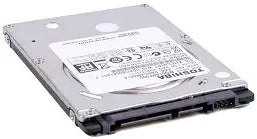
Toshiba VPC-F111FX/B 500GB Laptop Hard Drive - 5400RPM
A reliable 500GB 2.5-inch SATA replacement drive to restore or expand storage in your Sony VAIO VPC-F111FX/B laptop.
View price on Amazon
Affiliate Disclosure: As an Amazon Associate, Studio Supplies earns from qualifying purchases made through links on this page, at no additional cost to you. This helps support our editorial team.
Notice a mistake? Let Us Know
Overview
Key Features
Size: 2.5", 7mm height
Speed: 5400RPM, 12ms seek
Interface: Serial ATA 2.6/ATA-8
Transfer Rate: Up to 3.0GB/sec
Not compatible with Sony Restore disc. Requires standard Windows disc for installation.
Specifications
Capacity
500GB
Interface
SATA
Rotational Speed
5400RPM
Form Factor
2.5 inch
Height
7mm
Compatibility
Sony VAIO VPC-F111FX/B
Frequently Asked Questions
Is this hard drive specifically compatible with the Sony VAIO VPC-F111FX/B?
Yes, this 500GB SATA drive is designed as a direct replacement for the VPC-F111FX/B, matching its 2.5-inch form factor and 7mm height.
What speed does this drive operate at?
It runs at 5400RPM, which is standard for laptop hard drives and balances performance with low noise and heat output.
Can I use this drive in other laptops besides the Sony VAIO?
While marketed for the VPC-F111FX/B, any laptop that accepts a 2.5-inch, 7mm SATA hard drive should be compatible.
Will I need to install an operating system after swapping in this drive?
Yes, replacement drives come blank, so you will need to install an operating system and drivers after installation.
Related Products
