

TP-Link
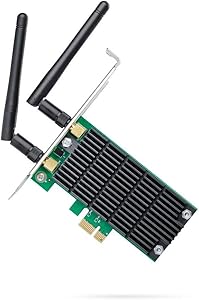
TP-Link Archer T4E AC1200 PCIe WiFi Adapter
Experience Fast and Reliable Wireless Connectivity The TP-Link AC1200 PCIe WiFi Card is designed to provide your desktop with high-speed, reliable wireless connectivity. Supporting dual-band WiFi and featuring advanced technologies like beamforming and heat sink cooling, it ensures stable and ef...
$29.99*
Check availability
*Price sourced from Amazon.com. Last updated:Aug 28, 2026.Price and availability are subject to change — details.
Affiliate Disclosure: As an Amazon Associate, Studio Supplies earns from qualifying purchases made through links on this page, at no additional cost to you. This helps support our editorial team.
Notice a mistake? Let Us Know
Overview
Experience Fast and Reliable Wireless Connectivity
The TP-Link AC1200 PCIe WiFi Card is designed to provide your desktop with high-speed, reliable wireless connectivity. Supporting dual-band WiFi and featuring advanced technologies like beamforming and heat sink cooling, it ensures stable and efficient performance for gaming, streaming, and more.
- Wireless Standard: 802.11ac
- Dual-Band: 2.4GHz and 5GHz
- Speed: AC1200 (up to 867Mbps on 5GHz, up to 300Mbps on 2.4GHz)
- Interface: PCIe
- Antennas: External antennas for easy alignment
- Security: WPA/WPA2 encryption
- Features: Beamforming, Heat Sink Technology
- Operating System Support: Windows 11/10/8.1/8/7/XP
Specifications
Model
Archer T4E AC1200
Interface
PCIe
Wi-Fi Standard
802.11ac
Wireless Speed (5GHz)
Up to 867Mbps
Wireless Speed (2.4GHz)
Up to 300Mbps
Antennas
Two External, Detachable
Dual Band
Yes
Backward Compatibility
802.11a/b/g/n
Frequently Asked Questions
What Wi-Fi speeds can I expect from the TP-Link Archer T4E AC1200 adapter?
This adapter offers AC1200 dual-band speeds, providing up to 867Mbps on the 5GHz band and 300Mbps on the 2.4GHz band.
What kind of interface does this Wi-Fi adapter use?
The TP-Link Archer T4E uses a PCIe interface, connecting directly to your desktop computer's motherboard for a stable connection.
Does this adapter come with antennas?
Yes, it includes two external antennas, designed to enhance Wi-Fi signal reception and extend wireless range.
Is this Wi-Fi adapter compatible with older Wi-Fi standards?
Yes, it is backward compatible with 802.11a/b/g/n standards, allowing it to work with a wide range of older network equipment.
Can this adapter connect to both 2.4GHz and 5GHz Wi-Fi networks?
Yes, the Archer T4E is a dual-band adapter, supporting both the 2.4GHz and 5GHz frequency bands for flexible network access.
Is installation of this adapter straightforward?
Installation requires opening your computer case to insert the PCIe card into an available slot on the motherboard.
What are the benefits of using a PCIe Wi-Fi adapter over a USB one?
PCIe adapters generally offer a more stable and higher-bandwidth connection to your system compared to USB adapters, and they don't occupy external USB ports.
Related Products


