



TP-Link
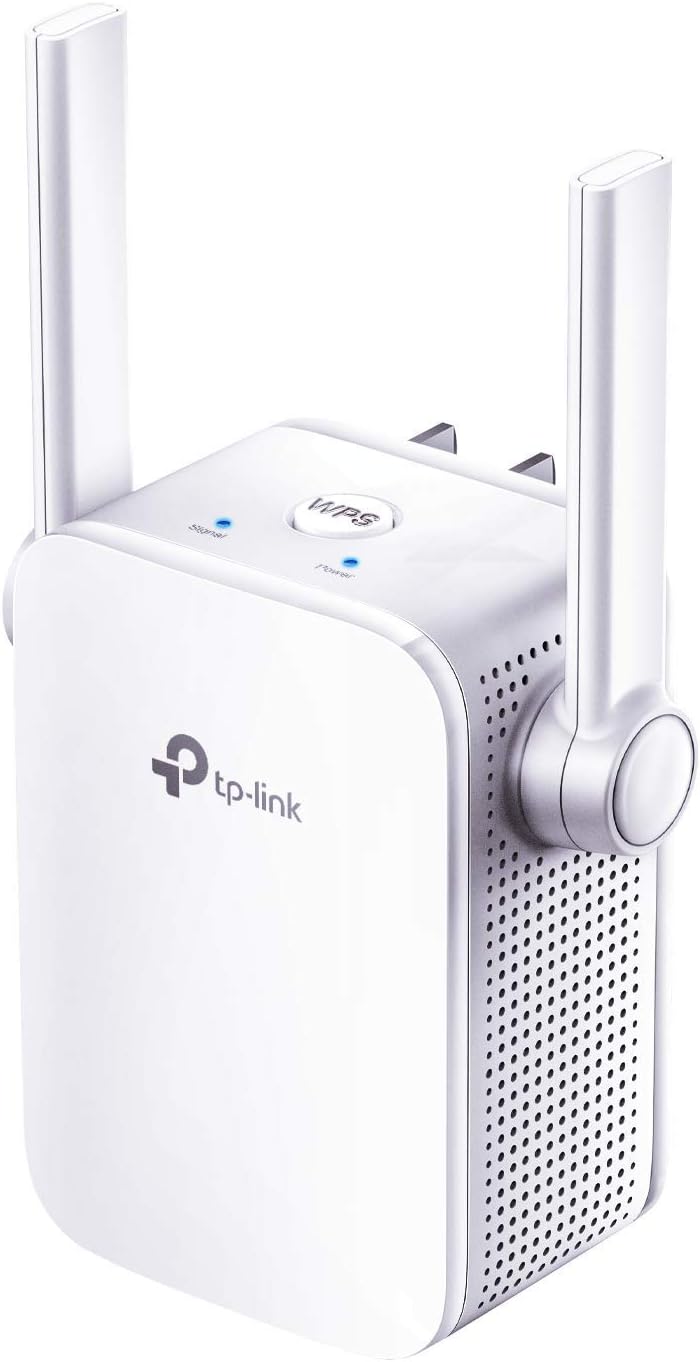
TP-Link ELCM N300 WiFi Extender: RE105, Signal Booster
Extend Your WiFi Range with EaseThe TP-Link N300 WiFi Extender (RE105) is designed to eliminate WiFi dead zones and provide reliable internet access throughout your home. With its compact design and two external antennas, this extender boosts your existing WiFi coverage, supporting speeds up to 3...
$16.98*$19.99Save 15%
View on Amazon
✓ In Stock on Amazon.com
*Price sourced from Amazon.com. Last updated:Oct 23, 2026.Price and availability are subject to change — details.
Affiliate Disclosure: As an Amazon Associate, Studio Supplies earns from qualifying purchases made through links on this page, at no additional cost to you. This helps support our editorial team.
Notice a mistake? Let Us Know
Overview
Extend Your WiFi Range with Ease
The TP-Link N300 WiFi Extender (RE105) is designed to eliminate WiFi dead zones and provide reliable internet access throughout your home. With its compact design and two external antennas, this extender boosts your existing WiFi coverage, supporting speeds up to 300Mbps. Easy to set up and manage, the RE105 offers both repeater and access point modes for flexible network expansion.
- Wireless Type: 802.11n, 802.11b, 802.11a, 802.11g
- Brand: TP-Link
- Series: RE105
- Data Transfer Rate: 300 Megabits Per Second
- Frequency Band Class: Single-Band (2.4GHz)
- Special Feature: LED indicator
- Ports: Fast Ethernet Port
- Product Dimensions: 3.15 x 2 x 2.7 inches
- Item Weight: 4.2 ounces
Key Features
Extend WiFi Coverage - Internet WiFi coverage with 2 external antennas for reliable Wi-Fi, compatible with any WiFi Router, Gateway, Access Point
More than a WiFi Repeater - RE105 also supports AP mode which creates a new Wi-Fi Access point for home
Fast Ethernet Port - Experience wired speed and reliability anywhere in your home by connecting your favorite device to the fast ethernet port
Better Range with External Antennas - Two external antennas with MIMO technology for improved range versus standard range extenders
Set Up in Minutes - Easily set up and manage your WiFi in a few quick and easy steps using the TP-Link Tether app (Android, iOS). Find the optimal location for the best WiFi connection with an intelligent signal indicator
All WiFi extenders are designed to increase or improve WiFi coverage, not to directly increase speed. In some cases improving signal reliability can affect overall throughput
Specifications
Model
RE105
WiFi Standard
N300
Antenna Type
2 External Antennas with MIMO Technology
Ethernet Port Type
Fast Ethernet Port
Operating Modes
Range Extender, Access Point (AP)
Management App
TP-Link Tether App (Android, iOS)
Frequently Asked Questions
Does the TP-Link RE105 WiFi extender increase internet speed?
No, the TP-Link RE105, like all WiFi extenders, is designed to increase or improve WiFi coverage and signal reliability, not to directly increase your internet speed.
Can the RE105 function as a new WiFi access point?
Yes, in addition to extending existing WiFi, the RE105 also supports Access Point (AP) mode, which allows it to create a new Wi-Fi access point for your home.
What kind of physical connectivity does the RE105 offer?
The RE105 features a Fast Ethernet Port, enabling you to connect a wired device to experience wired speed and reliability anywhere within your home network.
How do the external antennas improve the range?
The two external antennas on the RE105 utilize MIMO technology, which improves the range compared to standard range extenders by optimizing signal transmission and reception.
Is it easy to set up the TP-Link RE105?
Yes, the RE105 can be set up in minutes using the TP-Link Tether app, available on Android and iOS, which also helps find the optimal location for the best WiFi connection with an intelligent signal indicator.
Is this WiFi extender compatible with all routers?
Yes, the TP-Link RE105 is designed to be compatible with any standard WiFi Router, Gateway, or Access Point.
What kind of support does TP-Link offer for this extender?
TP-Link offers a 2-year warranty and 24/7 technical support for the RE105, ensuring assistance if you encounter any trouble during or after setup.
Related Products


