TP-Link

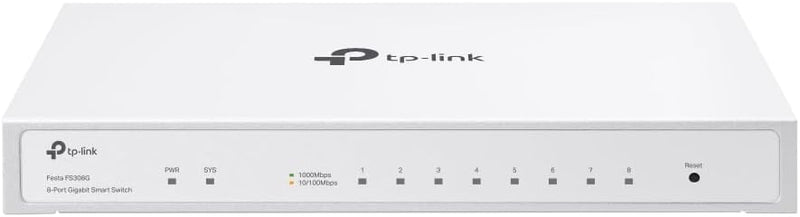
TP-Link Festa FS308G 8-Port Gigabit Managed Switch

4.7 (126439 reviews)

8-port gigabit managed switch with free cloud management, PoE-powered input, and fanless metal design for small businesses.

$56.93*
In Stock on Amazon.com
View on Amazon

*Price sourced from Amazon.com. Last updated:Jun 04, 2026.Price and availability are subject to change.

Affiliate Disclosure: Studio Supplies may earn a commission from qualifying purchases made through links on this page, at no additional cost to you. This helps support our editorial team.

Notice a mistake? Let Us Know

Overview

The TP-Link Festa FS308G is an 8-port gigabit managed switch built for small businesses, home offices, and advanced home networks that need more control than an unmanaged switch provides without the complexity of enterprise-grade hardware. All eight RJ45 ports deliver full gigabit speeds, and the switch is managed entirely through TP-Link's Festa Cloud platform — a free, centralized management interface accessible via the Festa mobile app or web portal. Self-Organizing Network technology and Zero-Touch Provisioning allow the switch to be deployed and configured with minimal technical expertise, making it accessible to business owners who do not have dedicated IT staff.

Despite its simplicity-first approach, the FS308G includes a robust set of Layer 2+ features: VLAN segmentation, access control lists, static routing, IGMP snooping, loop detection, storm control, rate limiting, and port isolation. The switch offers flexible installation through its dual power design — it can run from a standard 12V DC adapter or receive 802.3at/af PoE power on Port 8, which is particularly useful when mounting in locations without nearby power outlets. The fanless, all-metal enclosure ensures silent operation and supports both desktop and wall-mount placement. TP-Link backs the FS308G with a 3-year warranty and weekday technical support.

Key Features

𝐅𝐥𝐞𝐱𝐢𝐛𝐥𝐞 𝐅𝐮𝐥𝐥 𝐆𝐢𝐠𝐚𝐛𝐢𝐭 𝟖 𝐏𝐨𝐫𝐭 𝐂𝐨𝐧𝐟𝐢𝐠𝐮𝐫𝐚𝐭𝐢𝐨𝐧 - 8 × 10/100/1000 Mbps RJ45 ports provide high-speeds and reliable connections.

𝐂𝐨𝐦𝐩𝐥𝐞𝐭𝐞 𝐁𝐮𝐬𝐢𝐧𝐞𝐬𝐬-𝐂𝐥𝐚𝐬𝐬 𝐄𝐜𝐨𝐬𝐲𝐬𝐭𝐞𝐦 - Festa Self-Organizing Network platform integrates network devices, including switches, access points & routers with consumer-inspired simplicity.

𝐅𝐫𝐞𝐞 𝐂𝐞𝐧𝐭𝐫𝐚𝐥𝐢𝐳𝐞𝐝 𝐂𝐥𝐨𝐮𝐝 - Remote cloud access via the Festa app or web provides essential features for small businesses without the complexity required by larger-scale operation. Centralized cloud management is accessible at no costs from a single interface anywhere, anytime.

𝐌𝐮𝐥𝐭𝐢𝐩𝐥𝐞 𝐏𝐨𝐰𝐞𝐫𝐢𝐧𝐠 𝐎𝐩𝐭𝐢𝐨𝐧𝐬 𝐟𝐨𝐫 𝐄𝐚𝐬𝐲 𝐈𝐧𝐬𝐭𝐚𝐥𝐥𝐚𝐭𝐢𝐨𝐧 – Festa FS308G supports both 802.3at/af PoE power (Port 8 as PoE PD Port) and 12V/1A DC power supply, making deployment effortless and flexible. Please note it is a PoE-In device, not PoE-Out.

𝐃𝐨𝐞𝐬 𝐍𝐨𝐭 𝐰𝐨𝐫𝐤 𝐰𝐢𝐭𝐡 𝐎𝐦𝐚𝐝𝐚 𝐂𝐨𝐧𝐭𝐫𝐨𝐥𝐥𝐞𝐫. 𝐒𝐭𝐚𝐧𝐝𝐚𝐥𝐨𝐧𝐞 𝐌𝐨𝐝𝐞 𝐃𝐨𝐞𝐬 𝐍𝐨𝐭 𝐚𝐩𝐩𝐥𝐲 – Please note all TP-Link Festa Devices do not work with TP-Link Omada Controllers. Festa Devices require Festa Cloud to manage. Standalone mode does not apply.

𝐒𝐨𝐟𝐭𝐰𝐚𝐫𝐞 𝐅𝐞𝐚𝐭𝐮𝐫𝐞𝐬 - Static Routing helps route internal traffic for more efficient use of network resources. Advanced security features include Loopback Detection, Flow Control, IGMP Snooping, Rate Limit, Storm Control, Port Isolation and more.

𝐄𝐚𝐬𝐲 𝐒𝐞𝐭𝐮𝐩 𝐚𝐧𝐝 𝐔𝐬𝐞 - No professional IT technician is required. Festa App, Self-Organizing Networking, and Zero-Touch Provisioning technology make it a breeze.

𝐒𝐭𝐮𝐝𝐲 𝐌𝐞𝐭𝐚𝐥 𝐂𝐚𝐬𝐞 - Fanless quiet, durable metal casing and desktop/wall mounting design are well-suited for different environments.

𝟑 𝐲𝐞𝐚𝐫𝐬 𝐖𝐚𝐫𝐫𝐚𝐧𝐭𝐲 - Backed by our industry-leading 3-years warranty and free technical support from 6am to 6pm PST Monday to Fridays, you can work with confidence.

Specifications

Brand
TP-Link
Model
Festa FS308G
Ports
8 × 10/100/1000 Mbps RJ45
Management
Festa Cloud (App and Web), Free
Networking Features
VLAN, ACL, Static Routing, IGMP Snooping, Storm Control, Rate Limiting, Port Isolation, Loopback Detection
Provisioning
Self-Organizing Network (SON), Zero-Touch Provisioning (ZTP)
PoE
Port 8 PoE PD Input (802.3at/af) — PoE-In only, no PoE output
Power Options
12V/1A DC Power Supply or PoE Input (Port 8)
Design
Fanless, Metal Casing
Mounting
Desktop or Wall Mount
Omada Compatible
No
Warranty
3 Years

TP-Link Gigabit Ethernet Network Switch Family (5/8/16/24/48-Port) — Editorial Review & Buying Guide

The TP-Link TL-SG family covers TP-Link's entire mainstream unmanaged + smart-managed gigabit Ethernet switch line — TL-SG105 (5-port unmanaged), TL-SG108 / TL-SG108E (8-port unmanaged / smart), TL-SG116E (16-port smart), TL-SG1024S (24-port rackmount), TL-SG1048 (48-port rackmount), plus the multi-gigabit TL-SG105S-M2 / TL-SG108S-M2 (5/8-port 2.5Gbps) and managed FS308G variants. Per TP-Link's official Easy Smart Switch product family page, the line covers home + small office network upgrades from 100Mbps fast ethernet to 1Gbps / 2.5Gbps speeds, supports IEEE 802.3 / 802.3u / 802.3ab / 802.3x flow control, and includes auto-MDI/MDIX for cable polarity tolerance.

What the TP-Link TL-SG Family Specifically Wins

  • Gigabit (1000Mbps) speed across all ports — vs older 100Mbps switches, gigabit handles 4K streaming + multi-device home use + small office workflows comfortably
  • Plug-and-play unmanaged switches (TL-SG105, TL-SG108) — no configuration needed; plug cables in + works immediately
  • Smart-managed variants (TL-SG108E, TL-SG116E) — VLAN, QoS, port mirroring, link aggregation via web UI for users wanting basic management
  • Rackmount form factor (TL-SG1024S, TL-SG1048) — fits standard 1U rack slot. For larger home/office wiring closet
  • 2.5Gbps multi-gigabit variants (TL-SG105S-M2, TL-SG108S-M2) — for users with 2.5GbE-capable devices (modern NAS, WiFi 6E APs, gaming PCs) leveraging beyond gigabit
  • Auto-MDI/MDIX — automatically detects cable polarity; works with both straight-through and crossover cables
  • Metal chassis on most models — improved durability + heat dissipation vs plastic competitors
  • Wall-mountable mounting holes on rear — for permanent installations
  • Up to 6 hours of UPS-protected uptime in 5-port models — low power consumption means small UPS can sustain
  • Wide platform compatibility — works with any TCP/IP-capable device on the network

Where the TP-Link TL-SG Specifically Fits

  • Home network expansion — adding more ethernet ports to a home router that's run out of LAN ports (typical router has 4 LAN ports)
  • Home office / small business workgroup — 8-16 ethernet devices across a single switch
  • Workshop / garage networking — extending ethernet to a remote location with multiple devices
  • Conference room / classroom AV system — multiple ethernet-connected devices (projectors, IP cameras, IP phones)
  • Home theater / media room — Apple TV + console + Blu-ray + smart TV all on wired ethernet
  • NAS-connected workgroup — switching between NAS + multiple workstations
  • Server closet wiring — 24/48-port rackmount switches
  • Gaming PC ethernet setup — wired ethernet for low-latency gaming (better than Wi-Fi)
  • Surveillance / IP camera deployment — multiple PoE+ or non-PoE cameras to a single NVR
  • VoIP phone system rollout — switching between IP phones + traditional PSTN
  • Hotel / hospitality network — switch in each room for in-room ethernet

Honest Limits Buyers Should Know

  • Unmanaged switches (TL-SG105/108) cannot do VLAN / QoS. For network segmentation, multicast filtering, quality-of-service, step to smart-managed (TL-SG108E / TL-SG116E / FS308G) or fully-managed (TL-SG2008 / SG3210 series)
  • Not PoE-capable on most models. Standard TL-SG108 does NOT deliver power over ethernet. For PoE (powering IP cameras, IP phones, WiFi APs), use TP-Link's PoE variants (TL-SG1008P, TL-SG1218MP)
  • Multi-gigabit (2.5GbE) variants are limited. TL-SG105S-M2 / TL-SG108S-M2 are 2.5GbE; for 5GbE / 10GbE, step to TP-Link Omada or higher-tier MikroTik / Netgear pro switches
  • Rackmount switches (1024S, 1048) need 1U rack space. No rack? Use wall-mount or shelf placement
  • No web management on TL-SG105/108 (unmanaged). Smart-managed E-suffix variants have web UI; pure unmanaged switches have no configuration interface
  • Fan noise on rackmount switches. 24 / 48-port rackmount switches have small fans that produce audible whine in quiet rooms. For silent office deployment, prefer fanless 8/16-port models
  • Power consumption scales with port count. 5-port: ~5W; 48-port: ~30W. Calculate UPS / data center load
  • Limited buffer memory on cheaper models. Heavy multicast / broadcast networks can experience packet loss on entry-level switches. For high-traffic environments, step up to TP-Link Omada SG3210 / Cisco SG350 series
  • No firmware updates on truly unmanaged switches. Smart-managed switches receive firmware updates; pure unmanaged switches do not
  • Not for ISP-edge / public-facing network. These are LAN switches, not WAN routers. They cannot do DHCP / NAT / firewall functions

Where Buyers Should Look Elsewhere

  • 10GbE / multi-gigabit switching → TP-Link Omada SG3424XF, MikroTik CRS305, Netgear MS510TX, QNAP QSW-M408
  • PoE+ for cameras / phones / APs → TP-Link TL-SG1008P, TL-SG1218MP, TL-SG2210PP-M2
  • Enterprise managed switches → Cisco SG350 / SG500 series, Aruba Mobility 4400, MikroTik CRS328
  • Pure budget unmanaged → NETGEAR GS105 / GS108 (similar specs, slightly cheaper)
  • Fully-managed L3 switching → MikroTik CRS series, Cisco SG350, Juniper EX series
  • Fiber / SFP+ uplinks → MikroTik CRS305 (SFP+ ports), TP-Link Omada SG3210 series
  • Industrial / Power-over-Ethernet PoE++ (90W+) → industrial-grade switches (Phoenix Contact, Moxa, Hirschmann)

Sources & Citations

  1. TP-Link, "Easy Smart Switch product family page," tp-link.com (accessed 2026-05-18)
  2. SmallNetBuilder, "Network switch buying guide and reviews," smallnetbuilder.com (accessed 2026-05-18)
  3. Tom's Hardware, "Gigabit ethernet switch comparison," tomshardware.com (accessed 2026-05-18)
  4. ServeTheHome, "Network switch reviews and benchmarks," servethehome.com (accessed 2026-05-18)

Last verified: 2026-05-18

Now that you've seen the details — ready to take a closer look?

View on Amazon

Pros & Cons

👍 Pros

  • Free cloud management via Festa app eliminates recurring subscription costs
  • Dual power options — DC adapter or PoE input on Port 8 — simplify installation
  • Fanless metal casing runs silently and supports desktop or wall mounting
  • Self-Organizing Network and Zero-Touch Provisioning make setup straightforward
  • Advanced features including VLANs, ACL, static routing, and IGMP snooping

👎 Cons

  • Not compatible with TP-Link Omada controllers, limiting integration with existing Omada networks
  • PoE-in only — cannot supply PoE power to connected devices like access points or cameras
  • Requires Festa Cloud for management with no standalone mode available
  • 8 ports may be insufficient for growing networks without adding additional switches

Frequently Asked Questions

No. The Festa FS308G is part of TP-Link's Festa platform and requires Festa Cloud for management. It is not compatible with Omada controllers, and standalone mode does not apply.
No. The FS308G supports PoE input only — Port 8 can receive 802.3at/af PoE power to run the switch itself. It does not supply PoE power to other devices.
Yes, centralized cloud management through the Festa app or web portal is available at no additional cost, with no subscription required.
It offers two powering options: a 12V/1A DC power supply or 802.3at/af PoE input via Port 8, giving flexibility in installation locations where a power outlet may not be convenient.
Yes, the FS308G uses a fanless design for completely silent operation, making it suitable for offices, retail spaces, and other noise-sensitive environments.