



TP-Link
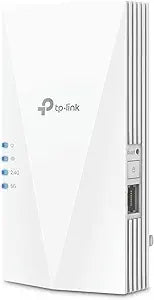
TP-Link RE600X AX1800 WiFi 6 Range Extender (Renewed)
WiFi 6's 1.8 Gbps dual-band throughput and OneMesh integration finally make dead zones a thing of the past.
$44.99*$69.99Save 35%
View on Amazon
✓ In Stock on Amazon.com
*Price sourced from Amazon.com. Last updated:Oct 23, 2026.Price and availability are subject to change — details.
Affiliate Disclosure: As an Amazon Associate, Studio Supplies earns from qualifying purchases made through links on this page, at no additional cost to you. This helps support our editorial team.
Notice a mistake? Let Us Know
Overview
Specifications
WiFi Standard
WiFi 6 (802.11ax)
Aggregate Speed
AX1800 (up to 1.8 Gbps)
2.4 GHz Band Speed
574 Mbps
5 GHz Band Speed
1201 Mbps
Frequency Bands
Dual-band (2.4 GHz + 5 GHz)
Antennas
2 internal
Coverage
Up to 1,500 sq. ft.
Device Support
Up to 30 devices
Ethernet Port
1x Gigabit
Operating Modes
Extender/Repeater, AP Mode
Mesh Support
TP-Link OneMesh
Condition
Renewed
Frequently Asked Questions
Does the RE600X require a WiFi 6 router to function?
No. The RE600X is universally compatible with any 802.11a/b/g/n/ac/ax router. That said, you'll only unlock the full AX1800 throughput potential when paired with a WiFi 6 router — older routers will negotiate down to their supported standard.
What does OneMesh compatibility actually mean for my network?
OneMesh allows the RE600X to join a unified network with a compatible TP-Link OneMesh router, so all devices share a single SSID and roam seamlessly. Without a compatible router, it operates as a standard extender with a separate network name.
Can the Gigabit Ethernet port be used to wire in a desktop or smart TV?
Yes. The single Gigabit Ethernet port lets you hardwire one device directly to the extender, bypassing WiFi entirely for that connection — useful for a gaming console or IPTV box sitting in the extended coverage zone.
How does the RE600X handle 30 simultaneous devices without congestion?
WiFi 6's OFDMA (Orthogonal Frequency Division Multiple Access) technology subdivides channels to serve multiple devices in parallel rather than sequentially. This is the core reason the RE600X can sustain usable throughput across 30 clients where older extenders degrade noticeably above 8–10.
This is a "Renewed" unit — what should I check on arrival?
Verify the firmware version via the TP-Link Tether app and update immediately if it's outdated. Renewed units are factory-reset and inspected, but firmware is often not updated to the latest release before shipping.
Related Products


