



TP-Link
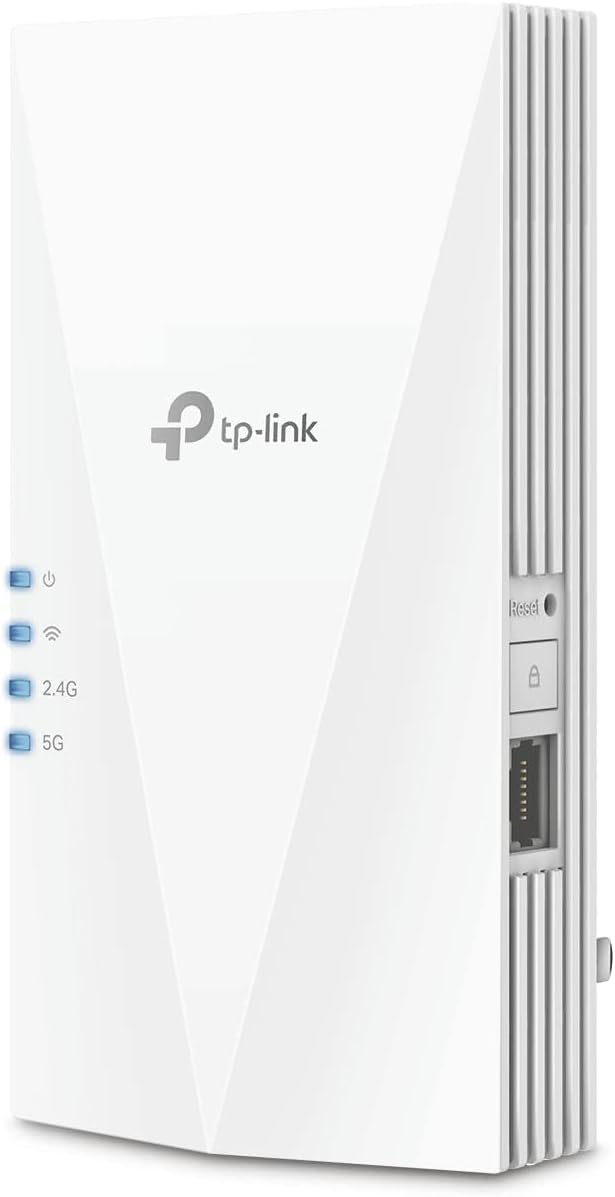
TP-Link RE700X AX3000 WiFi 6 Range Extender Booster
WiFi 6
Supercharge Your WiFi with the TP-Link AX3000 Range Extender Eliminate dead zones and boost your WiFi coverage with the TP-Link RE700X AX3000 WiFi 6 Range Extender. This dual-band extender delivers high-speed wireless performance, advanced features like OFDMA and Beamforming, and easy setup via t...
$99.99*
View on Amazon
✓ In Stock on Amazon.com
*Price sourced from Amazon.com. Last updated:Oct 24, 2026.Price and availability are subject to change — details.
Affiliate Disclosure: As an Amazon Associate, Studio Supplies earns from qualifying purchases made through links on this page, at no additional cost to you. This helps support our editorial team.
Notice a mistake? Let Us Know
Overview
Supercharge Your WiFi with the TP-Link AX3000 Range Extender
Eliminate dead zones and boost your WiFi coverage with the TP-Link RE700X AX3000 WiFi 6 Range Extender. This dual-band extender delivers high-speed wireless performance, advanced features like OFDMA and Beamforming, and easy setup via the TP-Link Tether app. Compatible with OneMesh for seamless whole-home coverage.
Specifications:
- Wireless Standard: 802.11ax (WiFi 6)
- Dual-Band: 2.4 GHz (574 Mbps) and 5 GHz (2402 Mbps)
- Gigabit Ethernet Port: 1
- Features: AP Mode, OFDMA, Beamforming, OneMesh Compatible
- Compatibility: Universal, works with all WiFi routers, gateways, and cable modems
- Setup: TP-Link Tether App (Android, iOS)
- Dimensions: 5.87 x 3.07 x 1.42 inches
- Weight: 9.1 ounces
Key Features
WiFi Extender Signal Booster For Home: Expand high-performance WiFi with RE700X featuring 4 high-performance amplifiers to reach hard-to-cover areas.
WiFi Booster with WiFi 6 Speeds: Enjoy smoother and more reliable streaming, gaming, downloading, and more with dual-band WiFi speeds up to 3 Gbps (2402 Mbps on 5 GHz and 574 Mbps on 2.4 GHz)
Connect More Devices to Your Network: Connect more devices that are out of range from your main router while eliminating poor performance and weak WiFi
WiFi Extender with Gigabit Ethernet Port: Experience wired speed and reliability anywhere in your home by connecting your favorite device to the gigabit ethernet port
OneMesh Compatible: Create a seamless WiFi network using compatible routers and range extenders so you never have to switch networks or lose signal. Compatible router: Archer AX21
Easy Set Up in Minutes: Easily set up and manage your WiFi in a few quick and easy steps using the TP-Link Tether app (Android, iOS). Find the optimal location for the best WiFi connection with intelligent signal indicator
Universal Compatibility: The AX3000 range extender is compatible with all WiFi-enabled devices and routers or access points. It even supports new AX phones, laptops and other devices¹
Please note that all Wireless Extenders are designed to increase or improve WiFi coverage and not to directly increase speed. In some cases improving signal reliability can affect overall throughput
Specifications
Brand
TP-Link
Model
RE700X
WiFi Standard
WiFi 6 (AX3000)
WiFi Speeds
Up to 3 Gbps (2402 Mbps on 5 GHz, 574 Mbps on 2.4 GHz)
Antennas
4 high-performance amplifiers
Ethernet Port
1 x Gigabit Ethernet Port
Compatibility
Universal, OneMesh compatible (e.g., Archer AX21)
Setup
TP-Link Tether app (Android, iOS) with intelligent signal indicator
Function
WiFi Extender, Signal Booster
Frequently Asked Questions
What is the primary function of the TP-Link RE700X WiFi Extender?
The primary function of the TP-Link RE700X is to expand high-performance WiFi coverage in your home, reaching hard-to-cover areas with its signal booster capabilities.
What WiFi speeds can I expect from this range extender?
You can expect dual-band WiFi 6 speeds up to 3 Gbps, with 2402 Mbps on the 5 GHz band and 574 Mbps on the 2.4 GHz band.
Does this extender increase my internet speed?
Please note that this wireless extender is designed to increase or improve WiFi coverage and not to directly increase your internet speed.
Can I connect wired devices to this extender?
Yes, the RE700X features a Gigabit Ethernet Port, allowing you to connect wired devices for reliable speed anywhere in your home.
Is the TP-Link RE700X compatible with my current router?
The AX3000 range extender offers universal compatibility, working with all WiFi-enabled devices, routers, or access points. It is also OneMesh compatible with certain routers like the Archer AX21.
How do I set up the RE700X?
Setup is designed to be easy and can be done in minutes using the TP-Link Tether app (available on Android and iOS), which also provides an intelligent signal indicator for optimal placement.
Related Products


