
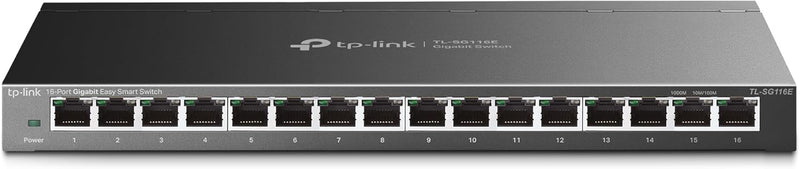


TP-Link Gigabit Ethernet Network Switch Family (5/8/16/24/48-Port) — Editorial Review & Buying Guide
The TP-Link TL-SG family covers TP-Link's entire mainstream unmanaged + smart-managed gigabit Ethernet switch line — TL-SG105 (5-port unmanaged), TL-SG108 / TL-SG108E (8-port unmanaged / smart), TL-SG116E (16-port smart), TL-SG1024S (24-port rackmount), TL-SG1048 (48-port rackmount), plus the multi-gigabit TL-SG105S-M2 / TL-SG108S-M2 (5/8-port 2.5Gbps) and managed FS308G variants. Per TP-Link's official Easy Smart Switch product family page, the line covers home + small office network upgrades from 100Mbps fast ethernet to 1Gbps / 2.5Gbps speeds, supports IEEE 802.3 / 802.3u / 802.3ab / 802.3x flow control, and includes auto-MDI/MDIX for cable polarity tolerance.
What the TP-Link TL-SG Family Specifically Wins
- Gigabit (1000Mbps) speed across all ports — vs older 100Mbps switches, gigabit handles 4K streaming + multi-device home use + small office workflows comfortably
- Plug-and-play unmanaged switches (TL-SG105, TL-SG108) — no configuration needed; plug cables in + works immediately
- Smart-managed variants (TL-SG108E, TL-SG116E) — VLAN, QoS, port mirroring, link aggregation via web UI for users wanting basic management
- Rackmount form factor (TL-SG1024S, TL-SG1048) — fits standard 1U rack slot. For larger home/office wiring closet
- 2.5Gbps multi-gigabit variants (TL-SG105S-M2, TL-SG108S-M2) — for users with 2.5GbE-capable devices (modern NAS, WiFi 6E APs, gaming PCs) leveraging beyond gigabit
- Auto-MDI/MDIX — automatically detects cable polarity; works with both straight-through and crossover cables
- Metal chassis on most models — improved durability + heat dissipation vs plastic competitors
- Wall-mountable mounting holes on rear — for permanent installations
- Up to 6 hours of UPS-protected uptime in 5-port models — low power consumption means small UPS can sustain
- Wide platform compatibility — works with any TCP/IP-capable device on the network
Where the TP-Link TL-SG Specifically Fits
- Home network expansion — adding more ethernet ports to a home router that's run out of LAN ports (typical router has 4 LAN ports)
- Home office / small business workgroup — 8-16 ethernet devices across a single switch
- Workshop / garage networking — extending ethernet to a remote location with multiple devices
- Conference room / classroom AV system — multiple ethernet-connected devices (projectors, IP cameras, IP phones)
- Home theater / media room — Apple TV + console + Blu-ray + smart TV all on wired ethernet
- NAS-connected workgroup — switching between NAS + multiple workstations
- Server closet wiring — 24/48-port rackmount switches
- Gaming PC ethernet setup — wired ethernet for low-latency gaming (better than Wi-Fi)
- Surveillance / IP camera deployment — multiple PoE+ or non-PoE cameras to a single NVR
- VoIP phone system rollout — switching between IP phones + traditional PSTN
- Hotel / hospitality network — switch in each room for in-room ethernet
Honest Limits Buyers Should Know
- Unmanaged switches (TL-SG105/108) cannot do VLAN / QoS. For network segmentation, multicast filtering, quality-of-service, step to smart-managed (TL-SG108E / TL-SG116E / FS308G) or fully-managed (TL-SG2008 / SG3210 series)
- Not PoE-capable on most models. Standard TL-SG108 does NOT deliver power over ethernet. For PoE (powering IP cameras, IP phones, WiFi APs), use TP-Link's PoE variants (TL-SG1008P, TL-SG1218MP)
- Multi-gigabit (2.5GbE) variants are limited. TL-SG105S-M2 / TL-SG108S-M2 are 2.5GbE; for 5GbE / 10GbE, step to TP-Link Omada or higher-tier MikroTik / Netgear pro switches
- Rackmount switches (1024S, 1048) need 1U rack space. No rack? Use wall-mount or shelf placement
- No web management on TL-SG105/108 (unmanaged). Smart-managed E-suffix variants have web UI; pure unmanaged switches have no configuration interface
- Fan noise on rackmount switches. 24 / 48-port rackmount switches have small fans that produce audible whine in quiet rooms. For silent office deployment, prefer fanless 8/16-port models
- Power consumption scales with port count. 5-port: ~5W; 48-port: ~30W. Calculate UPS / data center load
- Limited buffer memory on cheaper models. Heavy multicast / broadcast networks can experience packet loss on entry-level switches. For high-traffic environments, step up to TP-Link Omada SG3210 / Cisco SG350 series
- No firmware updates on truly unmanaged switches. Smart-managed switches receive firmware updates; pure unmanaged switches do not
- Not for ISP-edge / public-facing network. These are LAN switches, not WAN routers. They cannot do DHCP / NAT / firewall functions
Where Buyers Should Look Elsewhere
- 10GbE / multi-gigabit switching → TP-Link Omada SG3424XF, MikroTik CRS305, Netgear MS510TX, QNAP QSW-M408
- PoE+ for cameras / phones / APs → TP-Link TL-SG1008P, TL-SG1218MP, TL-SG2210PP-M2
- Enterprise managed switches → Cisco SG350 / SG500 series, Aruba Mobility 4400, MikroTik CRS328
- Pure budget unmanaged → NETGEAR GS105 / GS108 (similar specs, slightly cheaper)
- Fully-managed L3 switching → MikroTik CRS series, Cisco SG350, Juniper EX series
- Fiber / SFP+ uplinks → MikroTik CRS305 (SFP+ ports), TP-Link Omada SG3210 series
- Industrial / Power-over-Ethernet PoE++ (90W+) → industrial-grade switches (Phoenix Contact, Moxa, Hirschmann)
Sources & Citations
- TP-Link, "Easy Smart Switch product family page," tp-link.com (accessed 2026-05-18)
- SmallNetBuilder, "Network switch buying guide and reviews," smallnetbuilder.com (accessed 2026-05-18)
- Tom's Hardware, "Gigabit ethernet switch comparison," tomshardware.com (accessed 2026-05-18)
- ServeTheHome, "Network switch reviews and benchmarks," servethehome.com (accessed 2026-05-18)
Last verified: 2026-05-18


