

TP-Link
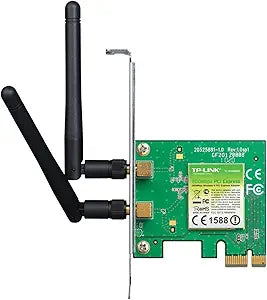
TP-Link TL-WN881ND 300Mbps Wireless N PCI-E Adapter
Affordable 300Mbps wireless N adapter that adds reliable Wi-Fi to any desktop PC via a PCI Express slot.
View price on Amazon
Affiliate Disclosure: Studio Supplies may earn a commission from qualifying purchases made through links on this page, at no additional cost to you. This helps support our editorial team.
Notice a mistake? Let Us Know
Overview
Enhance Your Wireless Connectivity with the TP-Link TL-WN881ND WiFi Adapter
The TP-Link TL-WN881ND Wireless N PCI Express Adapter allows you to connect your desktop computer to a wireless network for high-speed internet access. With speeds up to 300Mbps and MIMO technology, it provides stable and reliable wireless performance.
Specifications:
- Wireless Standard: IEEE 802.11n
- Wireless Speed: Up to 300Mbps
- Interface: PCI Express x1
- Technology: MIMO (multiple input, multiple output antennas)
- Security: WPA/WPA2 Encryptions
Pros & Cons
👍 Pros
- Very affordable way to add Wi-Fi to a desktop PC without built-in wireless
- MIMO dual-antenna design improves signal range and connection stability
- PCI Express interface provides a reliable, low-latency internal connection
- Simple installation with a standard PCIe x1 slot
👎 Cons
- Limited to 2.4GHz band only — no 5GHz support for less congested channels
- 300Mbps maximum speed is slow compared to modern Wi-Fi 5 and Wi-Fi 6 adapters
- Does not support the newer WPA3 security standard
- 802.11n is a legacy wireless standard that may not take advantage of newer router features
Frequently Asked Questions
What type of slot does this adapter require?
It uses a PCI Express x1 slot, which is available on virtually all modern desktop motherboards.
Does this adapter support 5GHz networks?
No, the TL-WN881ND operates on the 2.4GHz band only using the 802.11n wireless standard, with speeds up to 300Mbps.
Does it come with antennas?
Yes, it includes two external detachable antennas that use MIMO technology for improved wireless signal strength and stability.
What wireless security protocols does it support?
It supports WPA and WPA2 encryption to keep your wireless connection secure.
Is driver installation required?
Yes, you will need to install drivers for your operating system. TP-Link provides driver downloads on their support site.
Related Products


