

Western Digital
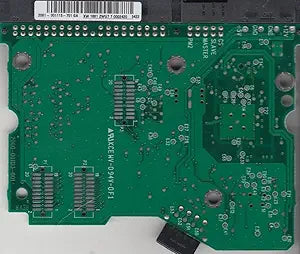
Western Digital PCB-WD400EB-11CPF0 IDE 3.5" PCB
Ensure Optimal Performance with a Replacement PCB Restore functionality to your Western Digital hard drive with this replacement PCB. Model WD400EB-11CPF0 ensures compatibility and proper operation. Specifications: Model: WD400EB-11CPF0 PCB Sticker: 2061-001113-701 GA PWB: 2060-001113-...
Check availability
Affiliate Disclosure: As an Amazon Associate, Studio Supplies earns from qualifying purchases made through links on this page, at no additional cost to you. This helps support our editorial team.
Notice a mistake? Let Us Know
Overview
Ensure Optimal Performance with a Replacement PCB
Restore functionality to your Western Digital hard drive with this replacement PCB. Model WD400EB-11CPF0 ensures compatibility and proper operation.
Specifications:
- Model: WD400EB-11CPF0
- PCB Sticker: 2061-001113-701 GA
- PWB: 2060-001113-001 REV A
- Hard Drive Type: IDE 3.5"
Key Features
See full specs below in description
Firmware Transfer Service Available
30-Day Money Back Guarantee
30-Day Tech Support
Specifications
Product Type
Hard Drive PCB
Interface
IDE
Form Factor
3.5"
Compatible Drive Model
WD400EB-11CPF0
Warranty
30-Day Money Back Guarantee
Support
30-Day Tech Support
Service Included
Firmware Transfer Service
Frequently Asked Questions
Why is the firmware transfer service important when replacing this Western Digital PCB?
The firmware transfer service is critical because each hard drive's PCB contains unique firmware and adaptive data that must be transferred to the replacement PCB for the drive to function correctly.
Is this PCB compatible with other Western Digital hard drive models?
No, this Western Digital PCB-WD400EB-11CPF0 is highly specific to the WD400EB-11CPF0 IDE 3.5" hard drive model and is not designed for universal compatibility with other drives.
What level of technical skill is required to replace this hard drive PCB?
Replacing a hard drive PCB and transferring firmware typically requires advanced technical skills and specialized tools, as incorrect handling can further damage the drive or data.
Does the 30-day money-back guarantee cover issues if I attempt the repair myself and it fails?
The 30-day money-back guarantee likely covers the functionality of the PCB itself, but it's important to clarify with the seller if it extends to issues arising from customer-attempted installations.
What should I do before attempting to replace my hard drive's PCB?
Before attempting a PCB replacement, it is crucial to ensure you have correctly identified the faulty PCB, have access to necessary tools, understand the firmware transfer process, and ideally back up any accessible data.
Related Products


