

Western Digital
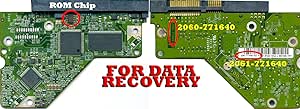
Western Digital WD1002FAEX 1TB Caviar Black Hard Drive PCB
Revive Your Data: Western Digital Caviar Black 1TB Hard Drive PCB with Firmware Transfer Is your hard drive failing? This Western Digital Caviar Black PCB replacement service offers a potential solution. Designed to replace a faulty circuit board, this service requires the transfer of firmware fr...
View price on Amazon
Affiliate Disclosure: As an Amazon Associate, Studio Supplies earns from qualifying purchases made through links on this page, at no additional cost to you. This helps support our editorial team.
Notice a mistake? Let Us Know
Overview
Revive Your Data: Western Digital Caviar Black 1TB Hard Drive PCB with Firmware Transfer
Is your hard drive failing? This Western Digital Caviar Black PCB replacement service offers a potential solution. Designed to replace a faulty circuit board, this service requires the transfer of firmware from your damaged board to ensure compatibility and data recovery.
Specifications:
- Model: WD1002FAEX-00Z3A0
- Firmware: Transfer Required from Damaged Board
- Capacity: 1TB
- PCB #: 2060-771640-003 REV P1
- DCM: HARNHTJABB
Specifications
Product Type
Hard Drive PCB
Compatibility
Western Digital WD1002FAEX 1TB Caviar Black Hard Drive
Capacity of Compatible Drive
1TB
Frequently Asked Questions
What exactly is the Western Digital WD1002FAEX PCB?
This product is the Printed Circuit Board (PCB) specifically designed as a replacement part for the Western Digital WD1002FAEX 1TB Caviar Black Hard Drive.
Is this a complete hard drive?
No, this is only the PCB component of a hard drive; it is not a complete, functional hard drive unit on its own.
What hard drive model is this PCB compatible with?
This PCB is explicitly designed for the Western Digital WD1002FAEX 1TB Caviar Black Hard Drive.
Can replacing the PCB fix any hard drive problem?
Replacing the PCB is typically effective only if the original hard drive's failure is due to a faulty controller board; it will not resolve mechanical issues or internal damage to the platters.
Is technical expertise required to replace this PCB?
Yes, replacing a hard drive PCB often requires technical knowledge and careful handling to ensure proper compatibility and function, including matching firmware versions.
Related Products
