

Western Digital
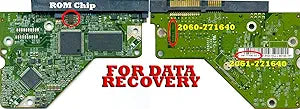
Western Digital WD10EALS - 1TB Hard Drive PCB - Firmware Transfer
Recover Your Data with the Western Digital WD Caviar Blue 1TB Hard Drive PCBThe Western Digital WD Caviar Blue 1TB Hard Drive PCB (with Firmware Transfer) is designed to help recover data from a failed hard drive. If your hard drive failure is due to a circuit board issue, this replacement PCB ca...
View price on Amazon
Affiliate Disclosure: As an Amazon Associate, Studio Supplies earns from qualifying purchases made through links on this page, at no additional cost to you. This helps support our editorial team.
Notice a mistake? Let Us Know
Overview
Recover Your Data with the Western Digital WD Caviar Blue 1TB Hard Drive PCB
The Western Digital WD Caviar Blue 1TB Hard Drive PCB (with Firmware Transfer) is designed to help recover data from a failed hard drive. If your hard drive failure is due to a circuit board issue, this replacement PCB can potentially restore functionality and save your valuable data...
Specifications
Product Type
Hard Drive PCB
Compatible Hard Drive Model
Western Digital WD10EALS
Hard Drive Capacity
1TB
Function
Firmware Transfer
Frequently Asked Questions
Is this Western Digital WD10EALS 1TB Hard Drive PCB a plug-and-play replacement part?
No, this PCB is specifically for "Firmware Transfer," which means it requires moving the unique firmware from your original faulty PCB to this replacement board. It is not a direct plug-and-play solution.
Can I use this PCB with a different model of Western Digital hard drive?
No, this PCB is designed exclusively for the Western Digital WD10EALS 1TB hard drive. Using it with a different model will likely result in incompatibility and further issues.
What kind of technical expertise is needed to use this PCB for firmware transfer?
Performing a firmware transfer requires specialized knowledge and tools, often involving soldering and specific data recovery equipment. It is typically a procedure for experienced technicians.
What is the purpose of transferring firmware to this PCB?
The firmware transfer is necessary because each hard drive has unique adaptive data stored on its PCB. Transferring this data to the new PCB is crucial for the drive to function correctly with its platters and read/write heads.
If my WD10EALS hard drive is clicking, will replacing the PCB fix the issue?
A clicking hard drive typically indicates a mechanical failure, such as issues with the read/write heads or platters, rather than a PCB problem. Replacing the PCB is unlikely to resolve a clicking issue; this PCB is primarily for electronic failures.
Related Products
