

Western Digital
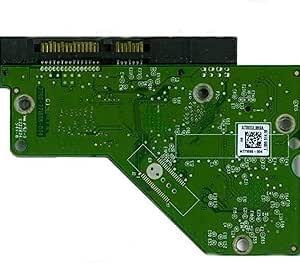
Western Digital WD20EACS 2TB Caviar Green Hard Drive PCB
Recover Your Data with the Western Digital WD Caviar Green 2TB Hard Drive PCB This Western Digital WD Caviar Green 2TB Hard Drive PCB is designed to help recover data from a failed hard drive due to circuit board issues. This board requires a firmware transfer from your original damaged board. S...
View price on Amazon
Affiliate Disclosure: As an Amazon Associate, Studio Supplies earns from qualifying purchases made through links on this page, at no additional cost to you. This helps support our editorial team.
Notice a mistake? Let Us Know
Overview
Recover Your Data with the Western Digital WD Caviar Green 2TB Hard Drive PCB
This Western Digital WD Caviar Green 2TB Hard Drive PCB is designed to help recover data from a failed hard drive due to circuit board issues. This board requires a firmware transfer from your original damaged board.
Specifications:
- Model: WD20EACS-11BHUB0
- Capacity: 2TB
- PCB Number: 2060-771698-002 REV A
- DCM: HHRNHTJCA
Note: Firmware transfer is required. The damaged board must be sent in for data transfer to the new board.
Specifications
Product Type
Hard Drive PCB
Hard Drive Compatibility
Western Digital WD20EACS
Hard Drive Capacity
2TB
Hard Drive Series
Caviar Green
Frequently Asked Questions
Which hard drive model is this PCB compatible with?
This PCB is specifically designed for the Western Digital WD20EACS 2TB Caviar Green Hard Drive.
Can this PCB replace the board on any Western Digital 2TB drive?
No, it is crucial that the PCB matches the exact model number, WD20EACS, to ensure proper compatibility and function.
Is replacing a hard drive PCB a simple process?
Replacing a hard drive PCB typically requires technical expertise and careful attention, as improper handling can lead to further damage.
Will this PCB fix my hard drive if it makes clicking noises?
A PCB replacement is generally for electrical failures; clicking noises often indicate mechanical issues with the read/write heads, which this PCB may not resolve.
Is data recovery guaranteed after replacing the PCB?
While a new PCB can resolve electrical issues and allow access to the drive, data recovery is not guaranteed if other components like the platters are damaged.
Related Products

