

Western Digital
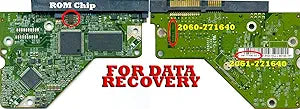
Western Digital WD5000AAKS 500GB Hard Drive PCB - Firmware Transfer
Revive Your Hard Drive with Western Digital Caviar Blue PCB The Western Digital WD Caviar Blue 500GB Hard Drive Donor PCB is designed to help you recover valuable data from a failed hard drive. This circuit board replacement requires firmware transfer from your original damaged board to ensure co...
$26.95*
Check availability
*Price sourced from Amazon.com. Last updated:Aug 30, 2026.Price and availability are subject to change — details.
Affiliate Disclosure: As an Amazon Associate, Studio Supplies earns from qualifying purchases made through links on this page, at no additional cost to you. This helps support our editorial team.
Notice a mistake? Let Us Know
Overview
Revive Your Hard Drive with Western Digital Caviar Blue PCB
The Western Digital WD Caviar Blue 500GB Hard Drive Donor PCB is designed to help you recover valuable data from a failed hard drive. This circuit board replacement requires firmware transfer from your original damaged board to ensure compatibility and successful data recovery.Specifications
- Brand: Western Digital
- Model: WD5000AAKS-60Z1A0
- Capacity: 500GB
- PCB #: 2060-771640-003 REV P1
- DCM: HANNHTJAHN
- Note: Firmware Transfer Required - Damaged board must be mailed in for data transfer.
Specifications
Brand
Western Digital
Model
WD5000AAKS
Component Type
Hard Drive PCB
Function
Firmware Transfer
Frequently Asked Questions
What is the primary purpose of this Western Digital WD5000AAKS Hard Drive PCB?
The primary purpose of this PCB is for firmware transfer, which is a critical step in data recovery when the original PCB of a WD5000AAKS hard drive has failed.
Is this product a complete hard drive?
No, this is a specialized replacement part—a Printed Circuit Board (PCB)—and not a complete hard drive for storage expansion.
What specific model of hard drive is this PCB compatible with?
This PCB is specifically designed for compatibility with the Western Digital WD5000AAKS hard drive model.
Do I need special skills to use this PCB for firmware transfer?
Yes, performing a firmware transfer and replacing a hard drive PCB requires advanced technical knowledge and specialized data recovery tools.
What risks are involved in replacing a hard drive PCB?
Incorrect handling during PCB replacement and firmware transfer can lead to further damage to the hard drive, potentially making data recovery impossible.
Why would someone need to transfer firmware to a new PCB?
Firmware transfer is necessary because the hard drive's unique calibration and adaptive data are stored on the PCB, and without it, a new PCB will not allow the drive to function correctly.
Related Products
