

Western Digital
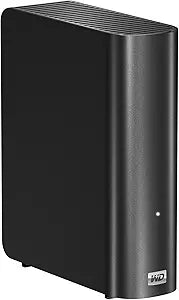
Western Digital WDBAAK0020HCH-NESN 2TB My Book USB 3.0 External HDD
USB 3.0USB 2.0
SuperSpeed Storage for Your Digital Life: WD My Book 3.0Safeguard your valuable data with the WD My Book 3.0 2 TB External Hard Drive. Offering SuperSpeed USB 3.0 connectivity, this drive delivers lightning-fast data transfers and ample storage space in an elegant, book-like design. Capacit...
Check availability
Affiliate Disclosure: As an Amazon Associate, Studio Supplies earns from qualifying purchases made through links on this page, at no additional cost to you. This helps support our editorial team.
Notice a mistake? Let Us Know
Overview
SuperSpeed Storage for Your Digital Life: WD My Book 3.0
Safeguard your valuable data with the WD My Book 3.0 2 TB External Hard Drive. Offering SuperSpeed USB 3.0 connectivity, this drive delivers lightning-fast data transfers and ample storage space in an elegant, book-like design.
- Capacity: 2 TB
- Interface: USB 3.0
- Transfer Rate: Up to 5 Gb/s
- Compatibility: Windows XP, Windows Vista, Windows 7
Key Features
SuperSpeed USB 3.0 interface
Ready to plug-and-play with Windows PCs
Compatible with USB 2.0 ports
Formatted NTFS
Specifications
Storage Capacity
2TB
Interface
SuperSpeed USB 3.0
Compatibility
USB 2.0 (backward compatible), Windows PCs (plug-and-play)
File System Format
NTFS
Product Line
My Book
Frequently Asked Questions
What is the main benefit of the SuperSpeed USB 3.0 interface on this hard drive?
The SuperSpeed USB 3.0 interface provides significantly faster data transfer rates compared to USB 2.0, allowing for quicker backups and file access.
Is the Western Digital My Book compatible with older USB 2.0 ports?
Yes, this external HDD is compatible with USB 2.0 ports, although data transfer speeds will be limited to USB 2.0 rates.
Do I need to format this hard drive before using it with a Windows PC?
No, the Western Digital My Book is formatted NTFS and is ready to plug-and-play with Windows PCs right out of the box.
Can this 2TB external hard drive be used with Mac computers?
While compatible, for optimal use with Mac computers, the drive may need to be reformatted to a Mac-compatible file system, which will erase all data.
Does the Western Digital My Book require an external power adapter?
The product description does not explicitly state the power requirements, but My Book desktop drives typically require an external power source.
Are there any backup software solutions included with this hard drive?
The product description focuses on the hardware specifications and does not mention the inclusion of any specific backup software.
What kind of physical dimensions does this 2TB My Book external hard drive have?
The physical dimensions are not provided in the product features, but it is an external desktop hard drive, typically larger than portable variants.
Related Products
