



Western Digital
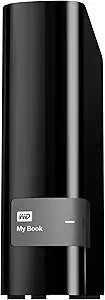
Western Digital WDBFJK0030HBK-NESN 3TB My Book External Hard Drive
USB 3.0
Three terabytes of USB 3.0 backup storage with hardware encryption and WD's automated backup software — straightforward desktop protection that just works.
$148.97*
View on Amazon
✓ In Stock on Amazon.com
*Price sourced from Amazon.com. Last updated:Oct 21, 2026.Price and availability are subject to change — details.
Affiliate Disclosure: As an Amazon Associate, Studio Supplies earns from qualifying purchases made through links on this page, at no additional cost to you. This helps support our editorial team.
Notice a mistake? Let Us Know
Overview
Key Features
Included WD Backup software makes backing up what's important to you easy and fast
For Mac compatibility this Hard Drive requires reformatting. Refer to Application Guide for guidance on this
Easy to use WD Backup software makes protecting what's important to you easy
Downloadable version of AcronisTrue Image WD Edition software offers system-level backup for complete protection
Compatible with Windows(R) File History, included on Windows 8 and Windows 10. Password protection with hardware encryption keep your private stuff private. USB 3.0 for fast data transfer rates
Specifications
Brand
Western Digital
Model
WDBFJK0030HBK-NESN
Capacity
3TB
Interface
USB 3.0
Encryption
Hardware (password-protected)
Included Software
WD Backup
Downloadable Software
Acronis True Image WD Edition
Windows Compatibility
Windows 8, Windows 10 (File History compatible)
Mac Compatibility
Yes (reformatting required)
Form Factor
Desktop (3.5-inch internal HDD)
Similar Products
Other products from the same family that visitors often consider:
 Currently Unavailable
Western Digital My Book WDBFJK0030HBK-NESN 3TB External HDD
Check on Amazon → ✓ Available
Western Digital WDBBGB0030HBK-EESN 3TB My Book USB 3.0 Drive
$259.00
View on Amazon → Currently Unavailable
Western Digital WDBWLG0030HBK-NESN 3TB Elements External Hard Drive
Check on Amazon → Currently Unavailable
Western Digital My Book Essential 1TB External Hard Drive
Check on Amazon → ✓ Available
Western Digital My Book 3TB USB 3.0 External HDD Renewed
$89.99
View on Amazon →Frequently Asked Questions
What transfer speeds does USB 3.0 actually deliver with this drive?
USB 3.0 provides a theoretical maximum of 5 Gbps. Real-world sequential transfer speeds for a 3.5-inch desktop HDD in this class typically land between 100–130 MB/s, which is limited by the spinning platter inside rather than the USB interface. For large file backups, that's roughly 8–10 GB per minute under favorable conditions.
Does this drive work with macOS out of the box?
No. The My Book ships formatted as NTFS for Windows. Mac users must reformat the drive to HFS+ or exFAT before use. Western Digital provides reformatting guidance, but the process erases all existing data — do this before copying any files to the drive.
What does the hardware encryption actually protect?
The hardware encryption on the My Book is tied to a user-set password. Without the password, the drive's contents cannot be read even if the enclosure is connected to another system. This protects data if the drive is lost or stolen, but recovery without the password is not possible — lost passwords mean lost data.
Can this drive be used as a Time Machine backup destination on a Mac?
Yes, after reformatting to HFS+ (or using macOS Disk Utility to create an HFS+ partition). Once reformatted and recognized by macOS, Time Machine can designate it as a backup volume in the normal way.
What is the difference between WD Backup and the Acronis True Image WD Edition software?
WD Backup is a lightweight file-and-folder backup tool designed for scheduled incremental backups. Acronis True Image WD Edition is a more comprehensive system-level backup tool that can create full disk images, enabling bare-metal recovery if your primary drive fails. Acronis must be downloaded separately and is the stronger choice for complete system protection.
Related Products
