



Western Digital
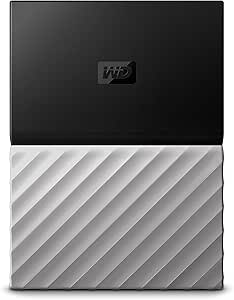
Western Digital WDBFKT0040BGY-WESN 4TB My Passport Ultra
USB 3.0USB 2.0
4TB of USB 3.0 portable storage in a metal-finish chassis — WD's reliability backing large-capacity backup and media transport.
$202.22*
Check availability
*Price sourced from Amazon.com. Last updated:Oct 21, 2026.Price and availability are subject to change — details.
Affiliate Disclosure: As an Amazon Associate, Studio Supplies earns from qualifying purchases made through links on this page, at no additional cost to you. This helps support our editorial team.
Notice a mistake? Let Us Know
Overview
Key Features
Brilliant design, pairing metal and matte finishes. Formatted for Windows 10, Windows 8.1 or Windows 7 operating systems. Requires reformatting for other operating systems.
Included WD Discovery software for social media and cloud storage import, backup and password protection
3-year limited warranty
Trusted drive built with WD reliability
USB 3.0 port; USB 2.0 compatible
Specifications
Capacity
4TB
Interface
USB 3.0 (USB 2.0 compatible)
Form Factor
2.5" portable (bus-powered)
Default File System
NTFS (Windows pre-formatted)
Encryption
AES 256-bit hardware (via WD Discovery software)
Compatible OS
Windows 10, 8.1, 7 (native); requires reformatting for macOS/Linux
Color
Black-Gray (metal and matte finish)
Warranty
3-year limited
Brand
Western Digital
Model
WDBFKT0040BGY-WESN
Frequently Asked Questions
What are the real-world transfer speeds of this drive, and does the USB 3.0 interface saturate on a modern PC?
The My Passport Ultra uses a USB 3.0 interface, which has a theoretical ceiling of 5Gbps. In practice, the mechanical HDD inside is the bottleneck — typical sustained sequential read/write speeds fall in the 100–130MB/s range, well below USB 3.0's limit. USB 3.0 does not saturate; the spinner itself is the constraint.
What is the actual USB transfer interface and what real-world speeds can I expect?
The drive uses USB 3.0 (5 Gbps theoretical bandwidth) and is USB 2.0 backward-compatible. With a 2.5" HDD spindle inside, real-world sequential read/write speeds are approximately 100–130 MB/s — the mechanical drive, not the USB 3.0 interface, is the throughput ceiling.
Is this drive formatted out of the box for Windows or Mac?
The My Passport Ultra ships pre-formatted as NTFS for Windows 10, 8.1, and 7. Mac users must reformat to exFAT or APFS/HFS+ before use — this erases any pre-loaded WD software. Note that NTFS volumes are read-only on macOS without third-party drivers.
Is the drive cross-platform compatible, or does it require reformatting for macOS?
Out of the box, the drive is formatted for Windows (NTFS) and works with Windows 7, 8.1, and 10 without setup. macOS can read NTFS natively but requires reformatting to exFAT or HFS+ for full read/write compatibility — WD's documentation covers this process, but the drive does not arrive Mac-ready.
Does the WD Discovery software provide meaningful value, and is it required for the drive to function?
WD Discovery is optional, not required — the drive mounts and operates as standard storage without any software installation. The software adds optional features: cloud/social media import, automated backup, and hardware encryption via a password. Users who prefer a clean install can ignore it entirely.
Does the drive require external power?
No. The My Passport Ultra is bus-powered via the USB cable — no AC adapter required. On older systems with lower-output USB ports, a Y-cable may be needed to draw sufficient power for reliable operation.
What does the included WD Discovery software do, and is it required?
WD Discovery provides cloud import from social media/cloud services, local backup scheduling, and hardware-based password encryption (AES 256-bit). It is not required for basic drag-and-drop storage use; the drive functions as standard USB mass storage without it.
Does this drive support hardware encryption, and how is it configured?
Yes — hardware-based password protection is available through WD Discovery software. Enabling password protection activates hardware encryption. If the password is lost, the drive data is not recoverable, so this should only be enabled with a secure password record.
What is the warranty coverage on this drive?
Western Digital provides a 3-year limited warranty on this model, which is above average for portable external drives in this category and is serviceable through WD's standard RMA process.
What warranty does this drive carry?
Western Digital provides a 3-year limited warranty on the My Passport Ultra. Warranty service is handled directly through WD; coverage applies to manufacturing defects, not physical damage or data loss.
Related Products
