



Western Digital
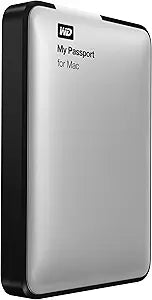
Western Digital WDBGCH5000ASL My Passport 500GB for Mac
Mac-formatted out of the box with USB 3.0 throughput, the WD My Passport for Mac delivers 500GB of portable storage that works immediately with Time Machine without reformatting.
$229.95*
View on Amazon
✓ In Stock on Amazon.com
*Price sourced from Amazon.com. Last updated:Oct 23, 2026.Price and availability are subject to change — details.
Affiliate Disclosure: As an Amazon Associate, Studio Supplies earns from qualifying purchases made through links on this page, at no additional cost to you. This helps support our editorial team.
Notice a mistake? Let Us Know
Overview
Specifications
Capacity
500GB
Interface
USB 3.0
Filesystem
HFS+ Journaled (Mac OS X)
Security
Password protection with hardware encryption
Compatibility
Mac OS X (HFS+ Journaled)
Model
WDBGCH5000ASL-NESN
Similar Products
Other products from the same family that visitors often consider:
 ✓ Available
Western Digital WDBLUZ5000ASL-NESN 500GB My Passport for Mac USB 3.0
$139.99
View on Amazon → Currently Unavailable
Western Digital WDBAAB5000ACH-EESN My Passport 500GB Mac USB 2.0
Check on Amazon → ✓ Available
Western Digital WDBL1D5000ABK My Passport Mac 500GB USB Drive
$229.99
View on Amazon → ✓ Available
Western Digital WDBPGC5000ARD-EESN My Passport 500GB Red
$107.00
View on Amazon → Currently Unavailable
Western Digital WDBACY5000ABK-EESN My Passport 500GB
Check on Amazon →Frequently Asked Questions
Does this drive work with Time Machine immediately out of the box?
Yes — the WD My Passport for Mac WDBGCH5000ASL ships pre-formatted in HFS+ Journaled (Mac OS Extended), which is the native filesystem Time Machine uses. On connection, macOS will prompt you to use it as a Time Machine destination without any reformatting required. This is the primary functional advantage over Windows-formatted drives that require reformatting before use with Time Machine.
What is the actual transfer speed over USB 3.0 with the internal spinning drive?
The USB 3.0 interface supports up to 5Gb/s theoretically, but the internal HDD's mechanical spindle is the real bottleneck — sustained sequential speeds on a portable 5400RPM drive typically run 80–120MB/s. For copying large files like video exports or photo archives, this is significantly faster than USB 2.0, but well below what a portable SSD would deliver on the same USB 3.0 interface.
Can this drive be used with a Windows PC as well?
The drive ships formatted HFS+, which Windows cannot natively read or write to. To use it with Windows, you would need to reformat it (which erases all data) or install third-party HFS+ drivers on the Windows machine. It is designed and positioned for Mac-only use — cross-platform use requires deliberate setup steps that negate the out-of-box convenience.
Does this drive include any hardware encryption or password protection?
Yes — the WD My Passport for Mac includes password protection with hardware encryption, securing the drive's contents against unauthorized access if the drive is lost or stolen. The encryption is managed through WD's software utilities.
What happens if I accidentally drop this drive while it's connected?
As a spinning hard drive, the WD My Passport for Mac is vulnerable to head crashes and data loss from impact during active read/write operations in a way that solid-state drives are not. WD's shock tolerance ratings apply primarily to non-operating conditions. For a portable drive used regularly in transit, the mechanical nature of the storage is the primary reliability risk factor — SSDs are substantially more resilient to physical shock under operating conditions.
Related Products
