

Western Digital
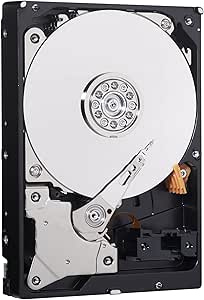
Western Digital WDBH2D0030HNC-NRSN 3TB 3.5" Desktop Mainstream HDD
Dependable Storage for Everyday Computing The Western Digital Desktop Mainstream Hard Drive delivers reliable performance for your office and web applications. Designed for primary use in desktop PCs, it provides the capacity and dependability you need for your daily computing tasks. Benefit from...
$65.00*
Check availability
*Price sourced from Amazon.com. Last updated:Aug 31, 2026.Price and availability are subject to change — details.
Affiliate Disclosure: As an Amazon Associate, Studio Supplies earns from qualifying purchases made through links on this page, at no additional cost to you. This helps support our editorial team.
Notice a mistake? Let Us Know
Overview
Dependable Storage for Everyday Computing
The Western Digital Desktop Mainstream Hard Drive delivers reliable performance for your office and web applications. Designed for primary use in desktop PCs, it provides the capacity and dependability you need for your daily computing tasks. Benefit from WD's award-winning technology and rigorous testing to ensure seamless integration with your system.
Specifications:
- Capacity: 3 TB
- Form Factor: 3.5-Inch
Key Features
Reliable everyday computing
WD quality and reliability
Massive capacity up to 3 TB
2-year limited warranty
Specifications
Brand
Western Digital
Capacity
3TB
Form Factor
3.5"
Type
Desktop Mainstream HDD
Warranty
2-year limited warranty
Frequently Asked Questions
What is the storage capacity of this Western Digital hard drive?
This Western Digital hard drive offers a massive capacity of 3 TB, providing ample space for your data.
Is this hard drive suitable for everyday computing tasks?
Yes, it is designed for reliable everyday computing, ensuring consistent performance for routine use.
Does this hard drive come with a warranty?
Yes, the Western Digital WDBH2D0030HNC-NRSN includes a 2-year limited warranty for peace of mind.
What kind of device is this hard drive intended for?
This is a 3.5" Desktop Mainstream HDD, specifically designed for internal use in desktop computers.
How does this product ensure quality?
It benefits from Western Digital's established quality and reliability standards, which are integral to the brand.
Related Products
