
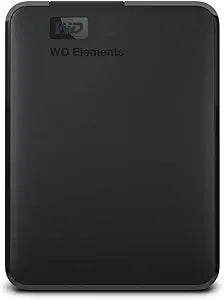
WD Elements Portable HDD (1TB / 2TB / 4TB / 5TB) — Editorial Review & Use Cases
The Western Digital Elements Portable family (WDBU6Y0020BBK-WESN, WDBUZG0010BBK-WESN, and related capacity SKUs from 1TB to 5TB) is WD's no-frills bus-powered USB 3.0 portable external hard drive line — designed for general backup, file transfer, and inexpensive bulk storage. Per Western Digital's official Elements Portable product family page, the line uses a 2.5" spinning HDD inside a plastic enclosure, USB 3.0 (5 Gbps) interface, bus-powered (no AC adapter), and ships with 2-year warranty. Real-world sustained transfer rates are 100-130 MB/s depending on capacity + file size.
What the WD Elements Portable Specifically Wins
- Lowest cost-per-TB external storage — 2TB at ~$60-70, 4TB at ~$100-130, 5TB at ~$130-180. Vs portable SSDs at $80-150 per TB, the Elements is dramatically cheaper for bulk storage
- Bus-powered USB 3.0 — single USB cable handles both data + power. No AC adapter, no wall-wart. Drops in pocket / bag / laptop sleeve
- WD reliability vs no-name external HDDs — WD's manufacturing controls + 2-year warranty are markedly better than no-name external drives (which routinely fail or lose data, especially in heat / vibration / repeated use)
- Universal compatibility — Windows / macOS / Linux / Chrome OS / Xbox One-X-S-Series / PS5 / Android (with USB-OTG cable) all recognize via USB Mass Storage class
- 2TB / 4TB / 5TB capacity range — the 5TB unit fits modern photo + video library + game save backup at ~$130. No competing tier matches this $ / TB
- Plug-and-play — no driver / software install — works immediately on every OS
- 2-year WD limited warranty + 1-year Data Recovery (WD Backup Pro service)
- Cool-running design — 2.5" HDD spins at 5400 RPM; runs warm but rarely overheats
Where the WD Elements Portable Specifically Fits
- Photo / video backup — RAW photo library backup, Lightroom catalog, video archive
- Bulk media library — movies, TV shows, music collections at lowest $ / TB
- System backup with Time Machine (Mac) / File History (Windows)
- Travel data backup — full system backup before / after trips
- Console game backup — Xbox Series X / S external storage for games (Xbox transfers games TO internal SSD for play)
- External archive drive — long-term files that don't need fast access
- Secondary backup target in 3-2-1 strategy (3 copies, 2 different media, 1 offsite)
- Linux ISO library for IT professionals
- VM image storage — VirtualBox / VMware / Parallels VM images on external for portable workflow
- Music production project archive
- 3D printing / CAD project storage
- Cheap secondary in office / school — file exchange + collaboration
Honest Limits Buyers Should Know
- Spinning HDD speed — markedly slower than SSDs. ~100-130 MB/s read/write vs portable SSDs at 500-1,050 MB/s. For active project work, video edit timeline scrubbing, or random-IOPS workloads, an SSD (SanDisk Extreme Portable, Samsung T7) is dramatically faster — but ~10x more expensive per TB
- Mechanical failure risk. All spinning HDDs eventually fail (typical lifespan 3-7 years of regular use). For irreplaceable data (only-copy photos, legal documents, financial records), maintain redundant copies. Never rely on a single HDD as the only copy
- Bus power limits. Some older laptops / unpowered hubs don't supply enough current. The drive may click, spin down, or fail to mount. Solution: use a powered USB hub, or laptop's direct USB-A port. USB-C laptops need USB-C-to-USB-A adapter
- Shock / drop intolerant. Spinning HDDs are mechanical; sudden drops while spinning damage heads + platters. For rugged use, look at SSDs (SanDisk Extreme PRO Portable SSD, LaCie Rugged) or properly-cased HDDs
- Moisture / dust intolerant. Sealed plastic enclosure offers no real water/dust protection. Keep dry, store cool
- Heat sensitive. Direct sun exposure (hot car interior) shortens HDD lifespan substantially. Keep in cool / dark storage when not actively in use
- Limited shelf storage life when powered-off. HDDs in storage for years can experience "stiction" — heads / bearings stick + don't spin up correctly. Power on at least once every 1-2 years to keep mechanical parts functioning
- NTFS / FAT32 / exFAT format choices. Out-of-box typically formatted NTFS (Windows). Mac users can read but not write; reformat to exFAT for cross-platform compatibility — but this erases all data + loses Time Machine compatibility
- No hardware encryption. Sensitive data should be encrypted via BitLocker (Windows) / FileVault (Mac) / VeraCrypt before storing
Where Buyers Should Look Elsewhere
- Speed-critical workflows (video editing, large game library) → SanDisk Extreme Portable SSD, Samsung T7, WD My Passport SSD
- Hardware encryption → WD My Passport Ultra (built-in WD Discovery encryption), Kingston IronKey
- Rugged / outdoor use → LaCie Rugged, SanDisk Extreme PRO Portable SSD V2, Samsung T7 Shield
- Desktop primary backup (more capacity) → 8TB+ desktop external HDD (WD My Book, Seagate Expansion Desktop) with AC power
- NAS / network backup → 2-bay NAS (Synology DS220+, QNAP TS-364) for centralized network backup
- Cloud backup (off-site) → Backblaze, Carbonite, iDrive for off-site protection
- Higher capacity portable (5TB+) → Seagate Expansion Portable 5TB, WD Elements 5TB
Sources & Citations
- Western Digital, "Elements Portable USB 3.0 HDD product family page," westerndigital.com (accessed 2026-05-18)
- Tom's Hardware, "External HDD review and buying guide," tomshardware.com (accessed 2026-05-18)
- Backblaze, "HDD reliability + failure rate studies," backblaze.com (accessed 2026-05-18)
- The Wirecutter (NYT), "Best portable hard drive buying guide," nytimes.com/wirecutter (accessed 2026-05-18)
Last verified: 2026-05-18

