



Western Digital
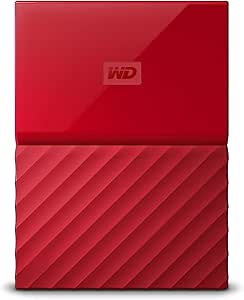
Western Digital WDBYFT0030BRD-WESN 3TB Red My Passport
USB 3.0USB 2.0
3TB of portable, hardware-encrypted USB 3.0 storage that backs up your files automatically right out of the box.
$217.36*
View on Amazon
✓ In Stock on Amazon.com
*Price sourced from Amazon.com. Last updated:Oct 23, 2026.Price and availability are subject to change — details.
Affiliate Disclosure: As an Amazon Associate, Studio Supplies earns from qualifying purchases made through links on this page, at no additional cost to you. This helps support our editorial team.
Notice a mistake? Let Us Know
Overview
Key Features
Auto backup with included WD Backup software
Password protection with hardware encryption
Trusted drive built with WD reliability
USB 3.0 port; USB 2.0 compatible. SYSTEM COMPATIBILITY: Windows 10, Windows 8.1, Windows 7. Requires reformatting for Mac OS X operating system
3-year manufacturer's limited warranty
Order with your Alexa enabled device. Just ask "Alexa, order WD My Passport"
Specifications
Brand
Western Digital
Model
WDBYFT0030BRD-WESN
Capacity
3TB
Color
Red
Interface
USB 3.0 (Micro-B), USB 2.0 compatible
Drive Type
2.5" Portable External Hard Drive
Encryption
AES 256-bit Hardware Encryption
Power
Bus-powered (no external adapter)
File System
NTFS (factory formatted)
Included Software
WD Backup, WD Security
OS Compatibility
Windows 10, 8.1, 7 (requires reformat for macOS)
Warranty
3-Year Limited
Similar Products
Other products from the same family that visitors often consider:
 Currently Unavailable
Western Digital WDBBKD0030BBY-EESN My Passport Ultra 3TB
Check on Amazon → Currently Unavailable
Western Digital WDBCGL0030BSL-NESN 3TB My Passport for Mac
Check on Amazon → Currently Unavailable
Western Digital WDBEZW0030BSL-NESN 3TB My Passport Ultra Silver
Check on Amazon → ✓ Available
Western Digital WDBYFT0030BOR My Passport 3TB Orange USB 3.0
$199.99
View on Amazon → Currently Unavailable
Western Digital WDBBKD0030BWT-EESN 3TB My Passport Ultra USB 3.0
Check on Amazon →Frequently Asked Questions
What are the actual read and write speeds of this drive over USB 3.0?
The My Passport uses a 2.5" spinning disk, so real-world sequential speeds typically reach 100–115 MB/s read and 95–105 MB/s write over USB 3.0. These are bounded by the mechanical drive inside, not the USB interface. USB 2.0 connections will cap throughput at roughly 30–35 MB/s.
Does the hardware encryption impact drive performance?
No — the encryption is handled by a dedicated hardware controller on the drive's bridge board, not by software on your PC. AES 256-bit encryption runs at line speed, so there is no measurable throughput penalty whether the password protection feature is enabled or disabled.
Can this drive be used with macOS without reformatting?
Out of the box, the My Passport is formatted as NTFS, which macOS can read but not write to. You will need to reformat the drive to APFS, HFS+, or exFAT (for cross-platform use) before writing files from a Mac. Reformatting erases all data on the drive.
Is this drive bus-powered, or does it require an external power adapter?
The My Passport is entirely bus-powered through its USB 3.0 Micro-B connection. No external power adapter is needed. It draws sufficient power from a standard USB 3.0 port, though some older or low-power USB 2.0 ports on hubs may not supply enough current.
How does the 3TB capacity compare to the physical size — is this drive thicker than lower-capacity models?
Yes. The 3TB and 4TB My Passport models are noticeably thicker than the 1TB and 2TB versions because they require additional platters to achieve the higher capacity. Expect a thickness around 21.5mm versus approximately 12.8mm for the thinner models.
Related Products
