



YUEHISY
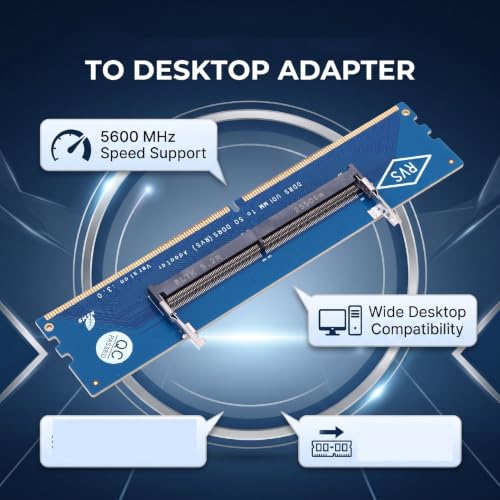
YUEHISY Laptop DDR5 to Desktop U-DIMM Memory Adapter Card
Turn spare laptop DDR5 5600MHz memory into desktop-ready RAM with a single low-cost U-DIMM adapter card
$12.79*
View on Amazon
✓ In Stock on Amazon.com
*Price sourced from Amazon.com. Last updated:Oct 25, 2026.Price and availability are subject to change — details.
Affiliate Disclosure: As an Amazon Associate, Studio Supplies earns from qualifying purchases made through links on this page, at no additional cost to you. This helps support our editorial team.
Notice a mistake? Let Us Know
Overview
Key Features
DDR5 Memory Converter: This adapter allows you to use a laptop DDR5 5600MHz memory module directly on a desktop motherboard, offering a practical solution for upgrading or repurposing laptop RAM without needing a new kit.
Desktop Memory Test Card: Support for motherboards, this card supports a wide range of notebook DDR5 memory frequencies, ensuring stable operation and reliable performance during testing or conversion tasks.
Memory Module Adapter: An efficient and low cost tool for testing laptop DDR5 memory module, this adapter helps verify module functionality and compatibility with desktop systems, saving time and resources on diagnostics.
Notebook RAM Converter: Support for 7, 8, 10, Support for Vista systems, the converter simplifies the process of converting laptop memory for desktop use, with no complex configuration required.
Laptop to Desktop RAM Adapter: This adapter provides precise conversion and testing capabilities, ensuring that each memory module maintains accuracy and reliability, making it ideal for technicians and DIY builders seeking consistent results.
Specifications
Brand
YUEHISY
Product Type
Laptop DDR5 to Desktop U-DIMM adapter card
Memory Type
DDR5
Supported Module Speed
Laptop DDR5 5600MHz
Source Module Format
Laptop (notebook) DDR5
Output Format
Desktop U-DIMM slot
Motherboard Support
Intel motherboards
Operating System Support
Windows Vista, 7, 8, 10
Primary Use
Memory conversion and module testing
Frequently Asked Questions
What exactly does the YUEHISY DDR5 adapter card do?
It lets a laptop DDR5 5600MHz memory module seat in a desktop motherboard's standard U-DIMM slot, so you can reuse or test notebook RAM on a desktop system.
Will this adapter work with AMD desktop motherboards?
The manufacturer lists support for Intel motherboards only. AMD platform compatibility is not stated in the product information, so treat it as unconfirmed.
Which operating systems does the card support?
The listed support covers Windows Vista, 7, 8, and 10. Windows 11 is not mentioned in the source material, so it is not confirmed by the manufacturer.
Can I use this to test whether a laptop DDR5 module is still good?
Yes. YUEHISY markets it as a memory test card, letting technicians verify a notebook DDR5 module's functionality on a desktop without rebuilding the laptop.
Does setting up the adapter require special software or configuration?
No. The manufacturer states the converter needs no complex configuration, with the intended process being to seat the module and verify operation.
Is this adapter a good way to add RAM to my desktop?
It suits diagnostics and repurposing single laptop modules rather than large builds, since it handles one DDR5 module at a time on a test-and-convert basis.
Related Products


