



ASRock
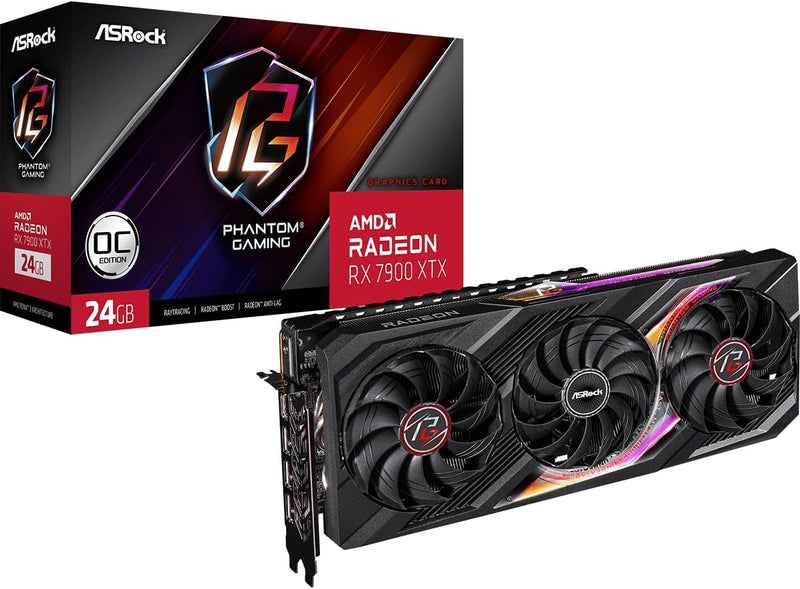
ASRock RX7900XTX PG 24GO Radeon Phantom Gaming 24GB
24GB of GDDR6 on a 384-bit bus means the ASRock RX 7900 XTX Phantom Gaming handles 4K textures and high-resolution workloads without hitting memory walls.
$1,289.00*
View on Amazon
✓ In Stock on Amazon.com
*Price sourced from Amazon.com. Last updated:Sep 13, 2026.Price and availability are subject to change — details.
Affiliate Disclosure: As an Amazon Associate, Studio Supplies earns from qualifying purchases made through links on this page, at no additional cost to you. This helps support our editorial team.
Notice a mistake? Let Us Know
Overview
Key Features
Flagship Gaming Performance, AMD Radeon RX 7900 XTX GPU with 2615 MHz boost clock and 24GB GDDR6 memory for elite 4K gaming
Advanced RDNA 3 Architecture, 96 compute units with RT+AI accelerators and 96MB AMD Infinity Cache technology
Premium Cooling Solution, Phantom Gaming 3X Cooling System with Striped Ring Fans and reinforced metal frame
High-Speed Memory, 24GB GDDR6 on 384-bit memory bus delivers exceptional bandwidth for 4K gaming and content creation
Silent Operation, 0dB Silent Cooling technology ensures zero fan noise during low-intensity tasks
Durable Construction, Reinforced metal frame and stylish metal backplate for enhanced structural integrity
Modern Display Support, 3x DisplayPort 2.1 and 1x HDMI 2.1 outputs for high-refresh-rate 4K displays
RGB Lighting, Polychrome SYNC compatibility for synchronized lighting with other ASRock components
Compatibility Note, Verify power supply capacity (recommended 800W minimum) and chassis space before purchase
Dedicated Support, Contact us directly through Amazon for any product questions or assistance
Specifications
Model
RX7900XTX PG 24GO Radeon Phantom Gaming
Video Memory
24GB
Cooling System
Phantom Gaming 3X Cooling System
Fan Type
Striped Ring Fan
Frame Construction
Reinforced Metal Frame
Backplate
Stylish Metal Backplate
RGB Sync
Polychrome SYNC
Similar Products
Other products from the same family that visitors often consider:
 ✓ Available
ASRock RX7900XTX TC 24GO AMD Radeon Taichi Graphics Card
$1,299.22
View on Amazon → ✓ Available
ASRock Phantom Gaming D Radeon RX 580 Renewed
$298.98
View on Amazon → Currently Unavailable
ASRock 90-GA0K00-00UANF Phantom Gaming D Radeon RX 570
Check on Amazon → Currently Unavailable
ASRock RX7600 PG 8GO Phantom Gaming Radeon RX 7600 OC - 8GB
Check on Amazon →Frequently Asked Questions
Will this card fit in a mid-tower ATX case, and how much clearance do I need?
The RX 7900 XTX Phantom Gaming uses a triple-fan cooler, which typically puts it in the 330–340mm length range — verify your case's GPU clearance spec before purchasing. Most full-size ATX mid-towers accommodate it, but compact or mATX cases may be tight.
The card requires three 8-pin connectors — what does that mean for my power supply?
Three 8-pin connectors deliver up to 600W of supplemental power. The RX 7900 XTX has a rated TDP near 355W, but ASRock's cooling and power delivery design can draw more under sustained load. A quality 850W or higher PSU is strongly recommended — 750W is the absolute minimum and leaves little headroom.
Does PCIe 4.0 support limit performance if my motherboard is PCIe 5.0?
No — the card will run at full performance in a PCIe 5.0 slot. PCIe is backward and forward compatible, and the bandwidth difference between PCIe 4.0 x16 and PCIe 5.0 x16 has no measurable impact on GPU-bound workloads at current performance levels.
What does Polychrome SYNC do, and can I disable the RGB if I don't want it?
Polychrome SYNC is ASRock's RGB lighting ecosystem — it allows the card's RGB elements to synchronize with compatible ASRock motherboards and other Polychrome-enabled components. The lighting can be turned off entirely via the Polychrome SYNC software if you prefer a dark build.
How does the Phantom Gaming 3X cooling system handle sustained loads in a closed case?
The triple-fan setup with 0dB silent mode at idle performs well in most cases with reasonable airflow. Under sustained gaming or compute workloads, fans ramp up noticeably — the card runs warm at the top end of AMD's thermal envelope. Case airflow quality has a measurable impact on long-session temperatures.
Related Products


