



Crucial
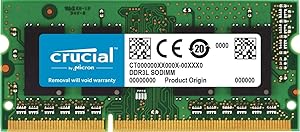
Crucial CT4G3S186DJM 4GB iMac DDR3L 1866MHz SODIMM
Squeeze 1866 MT/s DDR3L performance into your Late 2015 iMac Retina 5K with a Crucial-validated 4GB SODIMM upgrade that doubles down on multitasking headroom.
$38.32*$38.36Save 0%
View on Amazon
✓ In Stock on Amazon.com
*Price sourced from Amazon.com. Last updated:Sep 06, 2026.Price and availability are subject to change — details.
Affiliate Disclosure: As an Amazon Associate, Studio Supplies earns from qualifying purchases made through links on this page, at no additional cost to you. This helps support our editorial team.
Notice a mistake? Let Us Know
Overview
Key Features
204-pin SODIMM
DDR3-1866
Specifications
Capacity
4GB
Memory Type
DDR3L SODIMM
Speed
1866MHz
Pins
204-pin
Similar Products
Other products from the same family that visitors often consider:
 ✓ Available
Crucial CT51264BF186DJ 4GB DDR3L 1866MHz SODIMM Memory
$26.30
View on Amazon → ✓ Available
Crucial CT2KIT25664BF160B 4GB DDR3L SODIMM Kit
$29.99
View on Amazon → ✓ Available
Crucial CT4G3S186DJM 4GB iMac DDR3 Memory Upgrade
$38.36
View on Amazon →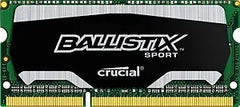 Currently Unavailable
Crucial BLS4G3N18AES4 4GB DDR3 1866MHz SODIMM Laptop Memory
Check on Amazon → ✓ Available
Crucial CT2K102464BF186D 16GB (2x8GB) DDR3L 1866MHz SODIMM
$78.89
View on Amazon →Frequently Asked Questions
Will this module definitely work in my iMac, or do I need to verify compatibility first?
Crucial specifically validates the CT4G3S186DJM for the iMac (Retina 5K, 27-inch, Late 2015), also identified as iMac17,1. If your system identifier matches, this is a confirmed-compatible module. You can check your model identifier in About This Mac > System Report.
What does DDR3L mean compared to standard DDR3, and does it matter?
DDR3L is a low-voltage variant operating at 1.35V instead of the standard DDR3's 1.5V. This module supports both voltages (1.35V and 1.5V), making it compatible with systems requiring either standard. The iMac17,1 benefits from the lower 1.35V operation, which reduces heat output inside the all-in-one chassis.
What bottleneck does adding this 4GB module solve?
The Late 2015 iMac ships with 8GB (2x4GB) in some configurations. Adding a third or fourth 4GB module increases total capacity, directly reducing the frequency of page file swapping to storage — a significant bottleneck when running multiple applications simultaneously on macOS.
Can I install this module alongside existing RAM for a capacity increase?
Yes. The 27-inch Late 2015 iMac has four user-accessible SODIMM slots. This 4GB module can be added alongside existing modules. For optimal dual-channel performance, install matched pairs (e.g., two CT4G3S186DJM modules) in the paired slots.
What are the latency specifications for this module?
The CT4G3S186DJM runs at CL13 (CAS Latency 13) at 1866 MT/s. At this speed, CL13 translates to approximately 13.9ns of true latency — competitive for the DDR3L generation and within the expected range for Apple-qualified memory in this platform.
Related Products


