

GE
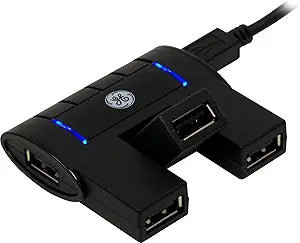
GE 98210 4-Port Flex USB 2.0 Hub
USB 2.0
Expand Your Connectivity with the GE 4-Port Flex USB Hub Effortlessly transfer files and connect multiple devices with the GE 4-Port Flex USB Hub. This compact and travel-friendly hub supports high-speed USB 2.0 data transfers and features a flexible rotating port, making it easy to connect vario...
Check availability
Affiliate Disclosure: As an Amazon Associate, Studio Supplies earns from qualifying purchases made through links on this page, at no additional cost to you. This helps support our editorial team.
Notice a mistake? Let Us Know
Overview
Expand Your Connectivity with the GE 4-Port Flex USB Hub
Effortlessly transfer files and connect multiple devices with the GE 4-Port Flex USB Hub. This compact and travel-friendly hub supports high-speed USB 2.0 data transfers and features a flexible rotating port, making it easy to connect various USB devices. Its LED indicators provide at-a-glance status updates.
Specifications:
- Ports: 4 USB 2.0 ports
- Features: Rotating center port, side port for larger devices
- Compatibility: PC and Mac compatible
- Data Transfer: High-speed data transfers
- Power: No AC adapter required
- Indicators: LED indicator lights
- Warranty: One-year limited warranty
Key Features
Connect up to four USB powered devices
Center port swivels 90 Degree for easy access
Side port perfect for larger devices
Includes travel-handy removable USB cable
Compact, lightweight and portable design
Blue LED indicator lights
Compatible with both USB 1.1 and USB 2.0
No AC adapter required
Specifications
Ports
4
USB Standard
USB 2.0
Special Feature
Center Port Swivels 90 degrees
Design
Compact Size, Lightweight Design
Frequently Asked Questions
Is this hub compatible with both Mac and Windows computers?
As a standard USB 2.0 hub, it is generally compatible with any operating system that supports USB, including Mac and Windows, without requiring special drivers.
Can I use this hub to charge my smartphone or tablet?
While it can provide some power, a USB 2.0 hub typically offers limited charging capabilities, primarily intended for data transfer and low-power peripherals rather than fast charging.
What is the main advantage of the center port swiveling 90 degrees?
The swiveling center port allows for greater flexibility in positioning connected devices or cables, which can be particularly useful in cramped spaces or for specific cable routing needs.
Does this hub require an external power adapter to function?
The features do not mention an external power adapter, suggesting it is a bus-powered hub that draws power directly from the connected computer.
Will this hub work with USB 3.0 or USB 3.1 devices?
Yes, USB 2.0 hubs are generally backward compatible with USB 3.0 and 3.1 devices, but the data transfer speeds will be limited to USB 2.0 specifications.
Related Products


