



ORICO
ORICO MG5 Magnetic Phone Docking Station with M.2 NVMe Enclosure
A pocket-sized magnetic dock that saves 4K ProRes straight from your iPhone to an M.2 SSD while adding eight ports
$59.99*
Check availability
*Price sourced from Amazon.com. Last updated:Oct 19, 2026.Price and availability are subject to change — details.
Affiliate Disclosure: As an Amazon Associate, Studio Supplies earns from qualifying purchases made through links on this page, at no additional cost to you. This helps support our editorial team.
Notice a mistake? Let Us Know
Overview
Key Features
Magnetic Docking Station: Break the mold of bulky dock with ORICO’s magnetic design, the dock snaps firmly to your phone, works with Mag-Safe or Android adhesive magnetic rings. Compact size slips easily into a pocket or bag. Built with high-level aluminum alloy, it ensures efficient heat dissipation, maintaining stable performance during 4K ProRes recording and large-file transmission. It turns Type-C phones and tablets into mobile workstations for creation and office scenarios
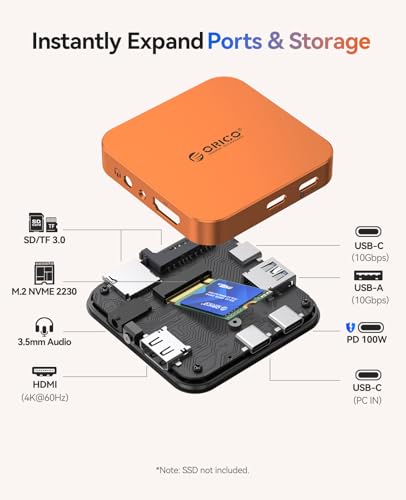
8-Port M.2 Docking Station: All-in-one multifunctional dock integrates an M.2 2230 NVMe enclosure and a 8-in-1 USB-C hub, equipped with 4K@60Hz HDMI port, 10Gbps USB-C/A ports, SD/TF Card Reader 3.0, 3.5mm AUX jack and 100W PD. It greatly expands device storage and interface scalability, enabling seamless connection and switching among smartphones, tablets and laptops. Note: This docking station has no built-in power storage function
10Gbps Speed & 4K Ultra HD Display: Equipped with USB 3.2 Gen2 protocol, ORICO MG5 dock delivers 10Gbps high-speed data transfer, finishing bulk video footage and photos copying in few seconds. The HDMI port provides stable 4K@60Hz output, suitable for streaming, gaming and business demos. More impressively, you can save 4K ProRes video shot on your iPhone directly to the M.2 SSD, freeing up phone storage
100W PD Pass-Through Charging: This ORICO Magnetic docking station has a 100W PD port for simultaneous operation and power supply, effectively preventing low-battery issues during long-time work via your power adapters or power banks. External PD power is required for high-power SSD operation. 3.5mm AUX jack enables high-fidelity audio recording with external microphones and fixes speaker mute problems, meeting vlogging and interview audio demands
Important Notices: ① For iPhone 14 and earlier (including SE), an OTG‑compatible adapter is required; if power is insufficient, connect this magnetic dock to PD power. ② The phone speaker mute after dock connected, just plug headphones into the AUX jack or disconnect the dock to restore sound. ③ New SSDs must be formatted to exFAT on a PC before first use. ④ Warmth during use is normal—the metal housing efficiently dissipates heat and does not affect data safety. For best results, use this dock in a well‑ventilated area
Specifications
Brand
ORICO
Model
MG5
Enclosure Type
M.2 2230 NVMe
Mounting
Magnetic (MagSafe / Android adhesive ring)
Data Transfer Speed
10Gbps (USB 3.2 Gen2)
Video Output
4K@60Hz HDMI
Card Reader
SD/TF Card Reader 3.0
Audio
3.5mm AUX jack
Power Delivery
100W PD pass-through
Total Ports
8-in-1 USB-C hub
Housing Material
Aluminum alloy
Supported Format
exFAT (format on PC before first use)
Frequently Asked Questions
Does the ORICO MG5 come with a built-in battery to power my phone?
No. The dock has no built-in power storage. It offers 100W PD pass-through charging, but you supply the power through your own adapter or power bank.
Can I save 4K ProRes video from my iPhone directly to the enclosure?
Yes. ORICO states you can save 4K ProRes video shot on your iPhone directly to an installed M.2 SSD, which frees up phone storage during shoots.
Why do my phone speakers go silent after I connect the dock?
This is expected behavior. The phone speaker mutes once the dock is connected; plug headphones into the 3.5mm AUX jack to restore sound, or disconnect the dock.
Do I need anything extra to use it with an iPhone 14 or earlier?
Yes. For iPhone 14 and earlier, including the SE, an OTG-compatible adapter is required, and you should connect PD power if power is insufficient.
Do I have to prepare a new SSD before using it in the enclosure?
Yes. New SSDs must be formatted to exFAT on a PC before first use, otherwise the drive will not work in the enclosure.
Is it normal for the dock to feel warm during use?
Yes. Warmth is normal because the aluminum housing dissipates heat, and ORICO notes it does not affect data safety. Use it in a well-ventilated area for best results.
Related Products


