



Price history
Generic
Generic M.2 Dual-Bay Docking Station with Offline Cloning
Clone one M.2 SSD to another with a single key press, no computer required, straight from the dock
$43.79*
View on Amazon
✓ In Stock on Amazon.com
*Price sourced from Amazon.com. Last updated:Aug 05, 2026.Price and availability are subject to change.
Affiliate Disclosure: Studio Supplies may earn a commission from qualifying purchases made through links on this page, at no additional cost to you. This helps support our editorial team.
Notice a mistake? Let Us Know
Overview
Key Features
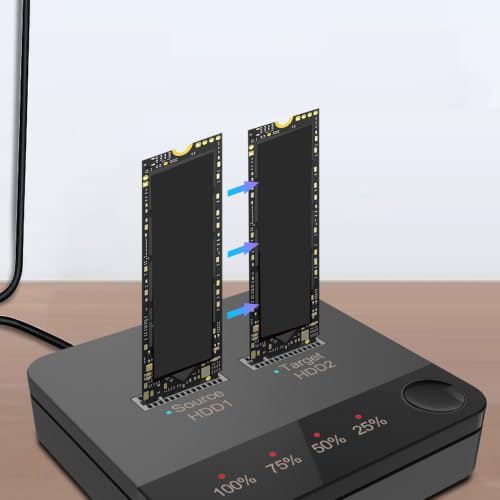
ONE KEY OFFLINE COPYING: Effortlessly transfer data from one hard drive to another without needing to connect to a computer, enabling seamless offline cloning.
DUAL BAY DESIGN: Enhance data transfer efficiency with a dual bay setup that significantly reduces copying time, making your workflow faster and smoother.
BROAD M.2 COMPATIBILITY: Supports various M.2 hard drive specifications, support for 2230, 2242, 2260, 2280, and 22110, allowing versatile usage for all your storage needs.
LED PROGRESS INDICATOR: Stay informed throughout the copying process with an easy to read LED indicator that clearly displays the cloning progress.
WIDE OPERATING SYSTEM SUPPORT: Support for (/7/8/10) and support for OS X for flexible use, ensuring this duplicator works seamlessly with your system of choice.
Specifications
Brand
Generic
Type
M.2 Dual Bay Docking Station
Bays
Dual bay
Cloning
One-key offline copying
Interface
Serial ATA
Supported Form Factors
2230, 2242, 2260, 2280, 22110
Progress Indicator
LED display
Operating System Support
Windows 7 / 8 / 10, OS X
Frequently Asked Questions
Can this docking station clone a drive without connecting it to a computer?
Yes. Its one-key offline copying feature transfers data directly from the source M.2 drive to the target drive while the dock operates on its own, no host computer required.
Which M.2 drive lengths fit in the dual bays?
The station supports 2230, 2242, 2260, 2280, and 22110 form factors, covering everything from short modules in compact laptops to the longest 22110 sticks.
How do I know when a copy job is finished?
An onboard LED progress indicator displays the cloning status throughout the process, so you can track how far along the copy is without any software.
Which operating systems does it work with?
The listing cites support for Windows 7, 8, and 10 as well as OS X, so a drive mounted in the dock can be read across those common platforms.
Does the destination drive need to be a certain size?
Because offline cloning copies the full source drive, the target should have a capacity equal to or greater than the source drive you are copying from.
Related Products


