

HP
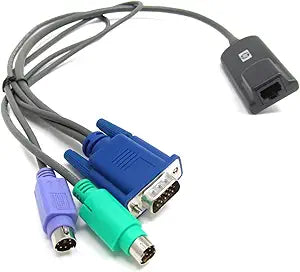
HP 262588-B21 - 2 KVM CAT5 PS/2 Interface Adapter
Connect PS/2 servers to your KVM switch over standard CAT5 cabling with this HP interface adapter.
$29.99*
View on Amazon
✓ In Stock on Amazon.com
*Price sourced from Amazon.com. Last updated:Jun 04, 2026.Price and availability are subject to change.
Affiliate Disclosure: Studio Supplies may earn a commission from qualifying purchases made through links on this page, at no additional cost to you. This helps support our editorial team.
Notice a mistake? Let Us Know
Overview
Specifications
Brand
HP
Model
262588-B21 (396632-001)
Type
KVM CAT5 Interface Adapter
Interface
PS/2 (Keyboard and Mouse)
Network Cable
Standard CAT5 / CAT5e (RJ-45)
Compatibility
HP KVM Switches
Pros & Cons
👍 Pros
- Replaces bulky dedicated KVM cables with inexpensive standard CAT5 Ethernet cabling
- Compact dongle form factor takes up minimal space in crowded server racks
- Simplifies server management by enabling remote keyboard and mouse access through the KVM switch
- HP-branded quality designed to integrate directly with HP KVM infrastructure
👎 Cons
- PS/2 interface only — not usable with servers that have exclusively USB ports
- Designed specifically for HP KVM switches, limiting use with other vendors' equipment
- Does not carry video — a separate video connection or a video-capable KVM module is still required
- Legacy product that may be difficult to find replacement units for as PS/2 servers age out
Frequently Asked Questions
What does this adapter actually do?
It converts a server's PS/2 keyboard and mouse ports into a single RJ-45 connection, allowing you to manage that server through an HP KVM switch using standard CAT5 cabling instead of bulky dedicated KVM cables.
Is this adapter compatible with non-HP KVM switches?
This adapter is designed for use with HP KVM switches that support CAT5 interface modules. Compatibility with third-party KVM switches is not guaranteed.
Does this adapter support USB connections or only PS/2?
This is a PS/2-only interface adapter. Servers that exclusively use USB ports for keyboard and mouse will require a USB variant instead.
Can I use any standard CAT5 Ethernet cable with this adapter?
Yes, you connect the adapter to your HP KVM switch using a standard CAT5 or CAT5e Ethernet patch cable, which simplifies cabling in dense rack environments.
Related Products


