

HP
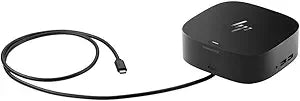
HP 5TW10UT#ABA--R - USB-C/A Universal Dock G5 - Renewed
122 x 12215WUSB-CUSB 3.0DisplayPort
Reliable Performance, Renewed ValueThe HP USB-C/A Universal Dock G5 offers a single connection point for all your devices. This renewed dock has been professionally inspected and tested to work and look like new, offering a cost-effective way to expand your connectivity. Condition: Renewed Insp...
$56.22*$101.15Save 44%
View on Amazon
✓ In Stock on Amazon.com
*Price sourced from Amazon.com. Last updated:Oct 23, 2026.Price and availability are subject to change — details.
Affiliate Disclosure: As an Amazon Associate, Studio Supplies earns from qualifying purchases made through links on this page, at no additional cost to you. This helps support our editorial team.
Notice a mistake? Let Us Know
Overview
Reliable Performance, Renewed Value
The HP USB-C/A Universal Dock G5 offers a single connection point for all your devices. This renewed dock has been professionally inspected and tested to work and look like new, offering a cost-effective way to expand your connectivity.
- Condition: Renewed
- Inspected and tested to work and look like new
- Eligible for replacement or refund under the Amazon Renewed Guarantee
Key Features
Ports: 1x USB-C port with data and power out (15W), 1x USB-C Cable to connect to host system (1 meter cable length), 2x USB 3.0 charging ports, 1x Combo Audio Jack, 2x USB 3.0 charging ports, 2x DisplayPort ports, 1x RJ45 port, 1x HDMI 2.0 port, 1x Standard lock slot.
External Monitor Support: 2 Monitors plus host notebook’s screen.
Dimensions (L x W x H): 4.80 x 4.80 x 1.77 inches (122 x 122 x 45 mm).
Weight: 1.53 lb (0.695 kg).
Drivers: DisplayLink drivers must be downloaded either through the HP support site or via Microsoft Windows updates.
Specifications
USB-C Ports
1 (with data and 15W power out), 1 (to host system, 1-meter cable)
USB 3.0 Charging Ports
4
DisplayPort Ports
2
RJ45 Port
1
HDMI 2.0 Port
1
Audio Port
1 Combo Audio Jack
Lock Slot
1 Standard lock slot
External Monitor Support
2 Monitors plus host notebook’s screen
Length
4.80 inches (122 mm)
Width
4.80 inches (122 mm)
Height
1.77 inches (45 mm)
Weight
1.53 lb (0.695 kg)
Frequently Asked Questions
How many external monitors can this docking station support?
This docking station can support up to two external monitors, in addition to the host notebook's screen.
What types of ports are available on the HP USB-C/A Universal Dock G5?
It features one USB-C port with data and 15W power out, four USB 3.0 charging ports, two DisplayPort ports, one RJ45 port, one HDMI 2.0 port, and a combo audio jack.
Is a cable included to connect the dock to my laptop?
Yes, a 1-meter USB-C cable is included for connecting the docking station to your host system.
What are the dimensions and weight of this docking station?
The dimensions are 4.80 x 4.80 x 1.77 inches (122 x 122 x 45 mm) and it weighs 1.53 lb (0.695 kg).
Are there any drivers required to use this docking station?
Yes, DisplayLink drivers must be downloaded either from the HP support site or via Microsoft Windows updates for full functionality.
Related Products


