

HP
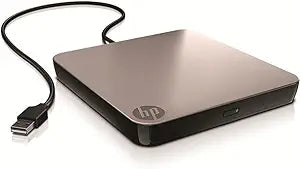
HP A2U56AA External USB DVD Drive
Portable and Convenient: HP External USB DVD Drive The HP USB External DVD Drive is a compact, sleek, and fast solution for portable storage and data transfer. With up to 8X DVD and 24X CD recording capability, this drive is perfect for editing and managing multimedia content. Its USB connectivi...
Check availability
Affiliate Disclosure: As an Amazon Associate, Studio Supplies earns from qualifying purchases made through links on this page, at no additional cost to you. This helps support our editorial team.
Notice a mistake? Let Us Know
Overview
Portable and Convenient: HP External USB DVD Drive
The HP USB External DVD Drive is a compact, sleek, and fast solution for portable storage and data transfer. With up to 8X DVD and 24X CD recording capability, this drive is perfect for editing and managing multimedia content. Its USB connectivity ensures easy data transfer and power, making it ideal for use with Windows systems.
Specifications:
- Type: External DVD Drive
- Connectivity: USB
- DVD Recording Speed: Up to 8X
- CD Recording Speed: Up to 24X
- Compatibility: Windows
- Features: Double-layer recording capability
- Software: Cyberlink Media Suite for editing and managing multimedia content
Key Features
The HP USB External DVD Drive is compact, sleek, and fast. Enjoy the convenience of portable storage that is Windows compatible, USB connectivity and double-layer recording.
Specifications
Connectivity
USB
Compatibility
Windows compatible
Recording Capability
Double-layer recording
Form Factor
External
Brand
HP
Frequently Asked Questions
Is the HP A2U56AA External USB DVD Drive portable?
Yes, the HP USB External DVD Drive is described as compact and sleek, making it convenient for portable use with your laptop or desktop.
What kind of connectivity does this DVD drive use?
This DVD drive uses USB connectivity, allowing for easy plug-and-play with compatible devices.
Is this drive compatible with Mac operating systems?
The product features explicitly state that it is "Windows compatible," but do not mention compatibility with Mac operating systems.
Can this drive write to double-layer DVDs?
Yes, the HP USB External DVD Drive supports double-layer recording, enabling you to store more data on compatible discs.
Does it require an external power adapter?
The product features do not specify an external power adapter; typically, USB external DVD drives are powered directly through the USB connection.
What is the primary purpose of this external DVD drive?
It is designed to provide the convenience of an optical drive for computers that lack one, allowing for disc-based software installation, data backup, and DVD playback.
Are there any specific software included with the drive for burning or playback?
The provided features do not mention any included software for disc burning or media playback; users may need to acquire such software separately.
Related Products


