



HP
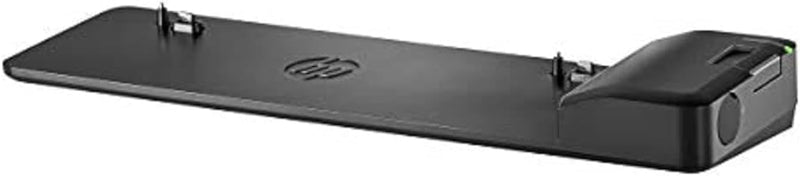
HP D9Y32AA#ABA Ultra Slim Dock 2013 Docking Station
USB 3.0DisplayPort
Expand your HP EliteBook into a full desktop workstation with one slim slide-in dock.
$13.12*
View on Amazon
✓ In Stock on Amazon.com
*Price sourced from Amazon.com. Last updated:Oct 23, 2026.Price and availability are subject to change — details.
Affiliate Disclosure: As an Amazon Associate, Studio Supplies earns from qualifying purchases made through links on this page, at no additional cost to you. This helps support our editorial team.
Notice a mistake? Let Us Know
Overview
Key Features
4x USB 3.0 ports.
2x DisplayPort, 1x VGA port.
1x LAN/Ethernet port, 1 x Line in, 1 x Line out
Lock Slot (lock not included)
Compatible with Hp EliteBook Notebook and Tablet PCs - see description for full compatibility list.
Specifications
Brand
HP
Model
D9Y32AA#ABA
Dock Type
Ultra Slim Side Dock
USB Ports
4x USB 3.0
Video Outputs
2x DisplayPort, 1x VGA
Network
1x LAN/Ethernet
Audio
1x Line In, 1x Line Out
Security
Lock Slot (lock not included)
Compatibility
Select HP EliteBook Notebook and Tablet PCs
Frequently Asked Questions
Which laptops are compatible with this docking station?
This dock is designed for select HP EliteBook Notebook and Tablet PCs. You should verify your specific EliteBook model against HP's published compatibility list before purchasing, as it does not support non-EliteBook HP laptops or other brands.
How many external monitors can this dock support simultaneously?
The dock has two DisplayPort outputs and one VGA port. Depending on your EliteBook model and its graphics capabilities, you can typically drive up to two external displays simultaneously.
Does this dock require a separate power adapter?
The dock itself connects to your laptop via a side-docking mechanism. You should check whether the dock includes a power adapter or if your EliteBook's own adapter is used, as configurations may vary.
Does the dock support USB 3.0 speeds on all four ports?
Yes, all four USB ports on the dock are USB 3.0, supporting data transfer speeds up to 5 Gbps.
Related Products


