

HP
HP dm1-1009tu 11.6" Laptop Replacement Screen
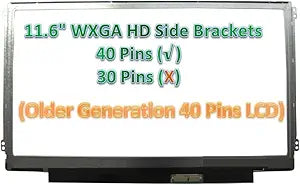
Restore your HP Pavilion dm1-1009tu's display with this precise-fit 11.6" WXGA HD replacement LED screen.
View price on Amazon
Affiliate Disclosure: As an Amazon Associate, Studio Supplies earns from qualifying purchases made through links on this page, at no additional cost to you. This helps support our editorial team.
Notice a mistake? Let Us Know
Overview
Revive Your HP Pavilion dm1-1009tu with a New Laptop Screen
Restore the visual clarity of your HP Pavilion dm1-1009tu laptop with this replacement 11.6-inch LED screen. This WXGA HD screen delivers a resolution of 1366x768, providing crisp and clear visuals for all your computing needs. Choose between a glossy or matte finish, depending on availability, to suit your viewing preferences.
Key Features:
- Screen Size: 11.6 inches
- Resolution: WXGA HD 1366x768
- Backlight Type: SLIM LED Bottom RIGHT
- Screen Finish: Glossy or Matte (Depends upon availability)
Frequently Asked Questions
Is this screen compatible with my specific HP Pavilion dm1-1009tu model?
Yes, this replacement screen is designed specifically for the HP Pavilion dm1-1009tu laptop and matches the original 11.6-inch form factor.
Will I receive a glossy or matte finish screen?
The finish depends on current availability — you may receive either a glossy or matte version. Both deliver the same 1366x768 resolution.
What type of backlight connector does this screen use?
This screen uses a SLIM LED connector positioned at the bottom right of the panel, which matches the original configuration of the dm1-1009tu.
Do I need any special tools to install this replacement screen?
You will typically need a small Phillips screwdriver and a plastic pry tool to remove the bezel. No soldering or specialized equipment is required.
Does this screen come with an installation guide?
The screen ships as a panel only. Installation guides for the dm1-1009tu are widely available online and the process is straightforward for anyone comfortable opening a laptop.
Related Products

