

HP
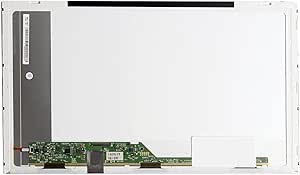
HP Pavilion dv6-2162nr 15.6" LED Laptop Screen
Restore your HP Pavilion dv6-2162nr to a clear, vibrant display with this compatible 15.6" LED replacement screen.
View price on Amazon
Affiliate Disclosure: As an Amazon Associate, Studio Supplies earns from qualifying purchases made through links on this page, at no additional cost to you. This helps support our editorial team.
Notice a mistake? Let Us Know
Overview
Restore Your HP Pavilion dv6-2162nr with a Replacement Screen
Replace a damaged or non-functioning screen on your HP Pavilion dv6-2162nr laptop with this compatible replacement. Ensure a clear and vibrant display with this LED screen, designed to match the original specifications of your laptop.
Specifications:
- Screen Size: 15.6 inches
- Resolution: 1366x768 (WXGA HD)
- Backlight: LED
- Connector Location: Bottom Left (when facing the back of the screen)
Frequently Asked Questions
Is this screen an exact replacement for the HP Pavilion dv6-2162nr?
Yes, this LED screen is designed to match the original display specifications of the HP Pavilion dv6-2162nr, including size, resolution, and connector placement.
Where is the connector located on this replacement screen?
The connector is located at the bottom left when you are facing the back of the screen, matching the original panel's layout for straightforward installation.
What resolution does this replacement screen support?
It supports a 1366x768 (WXGA HD) resolution, which is the same native resolution as the original screen in the dv6-2162nr.
Do I need any special tools to install this screen?
You will typically need a small Phillips-head screwdriver and a plastic pry tool to remove the bezel. A basic understanding of laptop disassembly is recommended, or you can have a technician handle the swap.
Related Products

