

HP
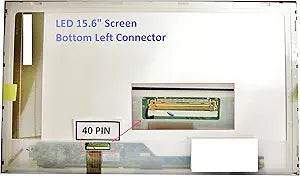
HP PAVILION DV6-6033CL 15.6" LED Laptop Screen
Restore your HP Pavilion DV6-6033CL to full visual clarity with this exact-fit 15.6-inch LED replacement screen.
View price on Amazon
Affiliate Disclosure: As an Amazon Associate, Studio Supplies earns from qualifying purchases made through links on this page, at no additional cost to you. This helps support our editorial team.
Notice a mistake? Let Us Know
Overview
Revive Your Laptop with a Crystal-Clear Display
Replace your damaged screen with this genuine OEM LCD screen. Guaranteed compatibility ensures your laptop returns to its original visual brilliance, resolving issues like cracks, dead pixels, and backlight failures.
- Screen Size: 15.6 inches
- Resolution: WXGA HD 1366x768
- Backlight: LED
- Connector Location: Bottom Left
Frequently Asked Questions
Is this screen specifically compatible with the HP Pavilion DV6-6033CL?
Yes. This LCD panel is designed as a direct replacement for the DV6-6033CL model, with matching dimensions, connector placement, and mounting points for a straightforward swap.
What resolution does this replacement screen display?
It provides WXGA HD resolution at 1366x768 pixels, which matches the original factory-installed panel in the DV6-6033CL.
Where is the video connector located on this panel?
The connector is located at the bottom left of the screen, which matches the cable routing in the DV6-6033CL chassis for a direct plug-in connection.
Does this screen use LED or CCFL backlighting?
It uses LED backlighting, which provides brighter illumination, more even light distribution, and lower power consumption compared to older CCFL panels.
Can I install this screen myself or do I need professional repair?
Many users install replacement laptop screens themselves with basic tools — typically just a small Phillips screwdriver. The process involves removing the bezel, unscrewing the panel, disconnecting the old cable, and reversing the steps with the new screen.
Related Products

