

HP
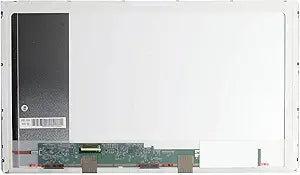
HP PAVILION DV7-4190US 17.3" LED Laptop Screen Replacement
A 17.3-inch WXGA++ LED replacement screen built specifically for the HP Pavilion DV7-4190US laptop.
View price on Amazon
Affiliate Disclosure: As an Amazon Associate, Studio Supplies earns from qualifying purchases made through links on this page, at no additional cost to you. This helps support our editorial team.
Notice a mistake? Let Us Know
Overview
Restore Your Laptop's Visuals with a Quality Replacement Screen
Replace your damaged laptop screen with this compatible LED display designed specifically for the HP PAVILION DV7-4190US. Ensure clear and vibrant visuals, restoring your laptop's functionality and usability. Before purchasing verify screen type (CCFL / LED / SLIM LED), SIZE, RESOLUTION, and PART NUMBER for compatibility.
Specifications:
- Compatibility: HP PAVILION DV7-4190US
- Screen Size: 17.3 inches
- Connector Location: Bottom Left (facing the back of the screen)
- Resolution: WXGA++ 1600x900
- Type: LED
Frequently Asked Questions
How do I confirm this screen is compatible with my laptop?
Verify that your laptop is the HP Pavilion DV7-4190US, and check that your original screen matches the specifications: 17.3-inch, LED type, WXGA++ 1600x900 resolution, and bottom-left connector location (when facing the back of the screen).
Is this an LED or CCFL backlit screen?
This is an LED-backlit screen. It is not compatible with laptops that use older CCFL backlighting, as the connectors and power requirements differ.
Where is the video connector located on this screen?
The connector is located on the bottom left when facing the back of the screen.
Does this replacement screen come with installation tools or instructions?
Typically, replacement screens ship as the panel only. You will need a small Phillips screwdriver and a plastic pry tool to remove the bezel and swap the screen.
Related Products

