

HP
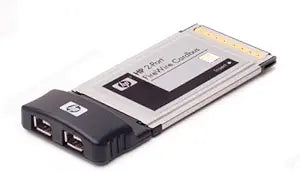
HP PM453A 2-Port USB 2.0 Cardbus Adapter
USB 2.0
Expand Your Notebook's Connectivity with the HP 2 Port USB 2.0 Cardbus The HP 2 Port USB 2.0 Cardbus adds two high-speed USB ports to your notebook PC. This plug-in card fits into a CardBus slot, providing a convenient way to connect USB devices. Specifications: Brand: HP Type: 2 Port USB...
View price on Amazon
Affiliate Disclosure: As an Amazon Associate, Studio Supplies earns from qualifying purchases made through links on this page, at no additional cost to you. This helps support our editorial team.
Notice a mistake? Let Us Know
Overview
Expand Your Notebook's Connectivity with the HP 2 Port USB 2.0 Cardbus
The HP 2 Port USB 2.0 Cardbus adds two high-speed USB ports to your notebook PC. This plug-in card fits into a CardBus slot, providing a convenient way to connect USB devices.
Specifications:
- Brand: HP
- Type: 2 Port USB 2.0 Cardbus
- Interface: Hi-Speed USB
- Ports: 2 x USB Type A
- Form Factor: CardBus
- Connectivity: Wired
Key Features
Device Type - USB adapter
Form Factor - Plug-in card
Interface (Bus) Type - PCI
Ports Quantity - 2 ports
Data Link Protocol - Hi-Speed USB
Specifications
Device Type
USB adapter
Form Factor
Plug-in card
Interface (Bus) Type
PCI
Ports Quantity
2 ports
Data Link Protocol
Hi-Speed USB
Frequently Asked Questions
What type of bus interface does the HP PM453A 2-Port USB 2.0 Cardbus Adapter use?
The HP PM453A adapter uses the PCI bus interface type, designed for compatible expansion slots in a computer.
How many USB ports does this adapter card provide?
This USB adapter provides 2 ports, allowing you to connect two USB 2.0 devices.
What is the data transfer speed supported by this USB adapter?
The adapter supports the Hi-Speed USB data link protocol, which enables data transfer rates up to 480 Mbps.
Is this a USB 3.0 or USB 3.1 compatible card?
No, this is a USB 2.0 adapter, so it does not support the faster speeds of USB 3.0 or USB 3.1.
Is installation of this adapter internal or external?
As a plug-in card with a PCI interface, this adapter requires internal installation within your computer's case.
Related Products


