



HP
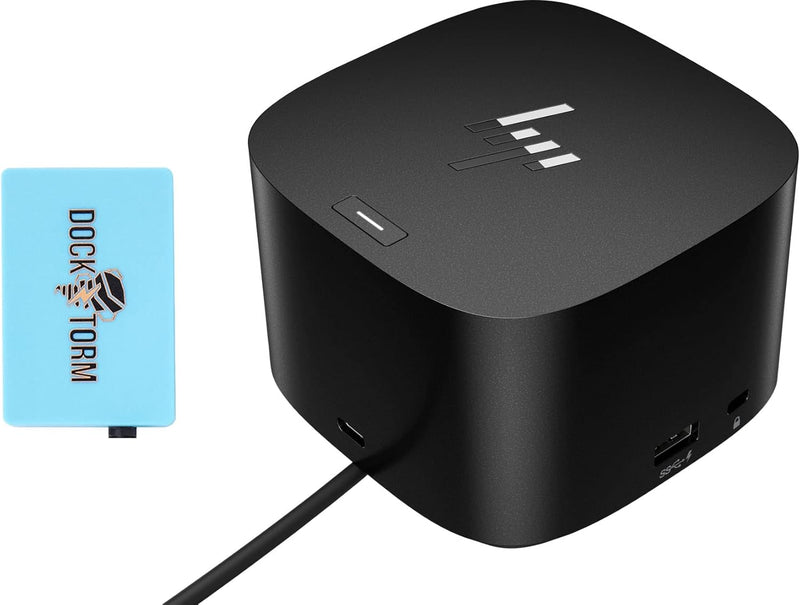
HP Thunderbolt Dock 280W G4 - Combo Cable Docking Station
4K3840 x 2160280WThunderbolt 4USB-C
One Thunderbolt 4 cable delivers 280W laptop charging, triple 4K display output, and 2.5Gb Ethernet — replacing your entire desk cable nest.
$319.99*$380.00Save 15%
View on Amazon
✓ In Stock on Amazon.com
*Price sourced from Amazon.com. Last updated:Oct 24, 2026.Price and availability are subject to change — details.
Affiliate Disclosure: As an Amazon Associate, Studio Supplies earns from qualifying purchases made through links on this page, at no additional cost to you. This helps support our editorial team.
Notice a mistake? Let Us Know
Overview
Key Features
Connectivity Technology: Wired. Supported Resolutions: 3840 x 2160. Screen Mode Supported: 4K. Device Supported: Notebook/Desktop PC. Ethernet Technology: Gigabit Ethernet
Host Interface: Thunderbolt 4. Total Number of USB Ports: 5. USB Type-C: Yes. USB Type-C Detail: USB-C DP Alt Mode Port. Number of RJ-45 Ports: 1. Network (RJ-45): Yes. Number of DisplayPorts: 2. DisplayPort Version: 1.4. Number of HDMI Ports: 1. HDMI Version: 2.0
The Power To Be Productive. Expanded Compatibility. Easy Connectivity. The Dock that Protects your Connected Devices
Device Management Made Easy. Minimum system requirements: Wired vPRO Management
What's in the box: Dock, power supply, power cord, warranty, With Dockztorm Hub
Specifications
Host Interface
Thunderbolt 4
Total USB Ports
5 (including USB-C DP Alt Mode)
DisplayPort Outputs
2 × DisplayPort 1.4
HDMI Output
1 × HDMI 2.0
Ethernet
1 × RJ-45 (1Gb / 2.5Gb)
Max Supported Resolution
3840 × 2160 (4K)
Power Delivery
280W total
OS Compatibility
Windows 11, Windows 10, macOS, ChromeOS
Dimensions
3.9 × 3.9 × 2.7 inches
Weight
1.68 lbs
In the Box
Dock, power supply, power cord, combo cable, warranty card, Dockztorm Hub
Frequently Asked Questions
Does this dock require a Thunderbolt 4 host port, or will it work with USB-C?
Thunderbolt 4 is required on the host to get full 40Gbps bandwidth and all three display outputs simultaneously. A USB-C only connection will work for basic charging and some data transfer, but display and bandwidth capabilities are significantly degraded — you won't get triple-monitor output without TB4.
How many 4K monitors can I drive at once, and at what refresh rate?
The G4 supports up to three external displays: two via DisplayPort 1.4 and one via HDMI 2.0. Each can run 3840x2160 (4K). DisplayPort 1.4's HBR3 bandwidth supports 4K@60Hz per port; HDMI 2.0 also handles 4K@60Hz. All three simultaneously requires the host to support Thunderbolt 4 multi-stream transport.
The spec sheet says 280W — how much of that actually reaches my laptop?
280W is the dock's total power budget from the included supply. Actual power delivery to the laptop depends on the host's negotiated PD contract. High-performance laptops like the HP ZBook or OMEN can pull up to 140W over TB4; the remainder powers downstream devices. This headroom makes the G4 suitable for workstation-class notebooks where 65W or 100W docks fall short under load.
Does it support 2.5Gb Ethernet, or only Gigabit?
Both. The single RJ-45 port auto-negotiates at 1Gb or 2.5Gb depending on your network switch. If you're on a modern router or switch with 2.5GbE ports, you'll see a real throughput improvement for large file transfers over the wire compared to standard Gigabit.
Is this compatible with macOS, or is it Windows-only?
macOS is officially listed as compatible. However, vPro device management features are Windows-only (requires Intel vPro platform). Full display and charging functionality works on macOS; ChromeOS is also supported.
Related Products


