

HP
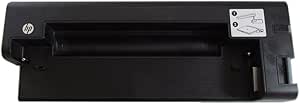
HP VU895AA 2540 Docking Station
A compact docking station purpose-built for the HP EliteBook 2540p, delivering full port replication and tidy cable management.
View price on Amazon
Affiliate Disclosure: As an Amazon Associate, Studio Supplies earns from qualifying purchases made through links on this page, at no additional cost to you. This helps support our editorial team.
Notice a mistake? Let Us Know
Overview
Enhance Connectivity with Streamlined Docking
The HP 2540 Docking Station provides comprehensive port replication and efficient cable management, all within a compact design. Specifically engineered for compatibility with the HP EliteBook 2540p Notebook PC.
- Compatibility: HP EliteBook 2540p Notebook PC
- Functionality: Full port replication and cable management
- Design: Space-saving
Frequently Asked Questions
Is the HP VU895AA docking station compatible with laptops other than the EliteBook 2540p?
No, this docking station is specifically engineered for the HP EliteBook 2540p Notebook PC and is not designed to work with other models.
Does the HP 2540 Docking Station require a separate power adapter?
Docking stations in this series typically use their own AC adapter to power both the dock and the connected laptop. Check the listing to confirm whether a power adapter is included.
How does the laptop connect to this docking station?
The EliteBook 2540p connects via a proprietary docking connector on the bottom of the laptop, allowing a single-motion dock and undock.
Does using the docking station charge the EliteBook 2540p's battery?
Yes, when a compatible power adapter is connected to the dock, it provides pass-through charging to the laptop while docked.
Related Products


