

HP
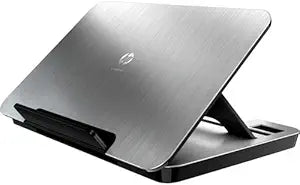
HP VY847AA#ABA USB Media Docking Station
Transform Your Workspace with Enhanced Connectivity The HP USB Media Docking Station seamlessly expands your notebook's capabilities, providing convenient access to peripherals, enhanced audio, and comfortable ergonomics. With its sleek design and integrated features, it's perfect for creating a ...
Check availability
Affiliate Disclosure: As an Amazon Associate, Studio Supplies earns from qualifying purchases made through links on this page, at no additional cost to you. This helps support our editorial team.
Notice a mistake? Let Us Know
Overview
Transform Your Workspace with Enhanced Connectivity
The HP USB Media Docking Station seamlessly expands your notebook's capabilities, providing convenient access to peripherals, enhanced audio, and comfortable ergonomics. With its sleek design and integrated features, it's perfect for creating a clutter-free and productive workspace.
Specifications:
- Compatibility: Notebooks with up to 17" diagonal screen and available USB port
- Video Support: High Def Video over USB (up to 1920x1080 resolution)
- Audio: Integrated High Def audio with 3" subwoofer and 4 Altec Lansing speakers (2.1 channel)
- USB Ports: 4 USB ports
- Connectivity: Ethernet, VGA
- Other Ports: Access to monitors, printers, speakers, and other peripherals
- Features: Adjustable viewing height (3 levels)
Key Features
Connect external devices to your notebook via a single USB connectionConnect external speakers, head
Specifications
Model
VY847AA#ABA
Connectivity to Notebook
Single USB connection
Audio Output
External speakers, head
Frequently Asked Questions
What is the main benefit of using the HP USB Media Docking Station?
The main benefit is connecting external devices to your notebook via a single USB connection, simplifying your setup and expanding connectivity.
Can I connect external speakers to this docking station?
Yes, the HP USB Media Docking Station is designed to allow connection of external speakers and head-mounted audio devices.
Does this docking station require a power adapter?
The provided features do not specify if an external power adapter is required for the HP USB Media Docking Station.
Is this docking station compatible with all notebook brands?
While designed by HP, specific compatibility with non-HP notebooks is not detailed in the product features.
What kind of USB connection does it use to connect to the notebook?
The HP USB Media Docking Station connects to your notebook via a single USB connection, though the specific USB standard (e.g., USB 2.0, 3.0) is not listed.
Related Products


