

Lenovo
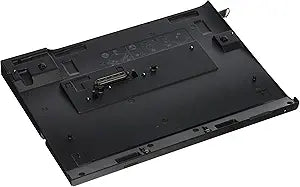
Lenovo 0A33932 Thinkpad X220 Ultrabase Docking Station
65W90WUSB 2.0
Expand Your ThinkPad's CapabilitiesThe Lenovo Thinkpad X220 Ultrabase Docking Station enhances the functionality of your ThinkPad X220 series laptop or tablet. Offering a range of expansion options in a portable design, this docking station is perfect for both office and on-the-go use. Port...
$89.99*
Check availability
*Price sourced from Amazon.com. Last updated:Oct 23, 2026.Price and availability are subject to change — details.
Affiliate Disclosure: As an Amazon Associate, Studio Supplies earns from qualifying purchases made through links on this page, at no additional cost to you. This helps support our editorial team.
Notice a mistake? Let Us Know
Overview
Expand Your ThinkPad's Capabilities
The Lenovo Thinkpad X220 Ultrabase Docking Station enhances the functionality of your ThinkPad X220 series laptop or tablet. Offering a range of expansion options in a portable design, this docking station is perfect for both office and on-the-go use.
- Ports: 4 x USB 2.0
- Video: VGA, DisplayPort
- Drive Bay: Ultra bay Slim for Optical Drive or Second Hard Drive
- Compatibility: ThinkPad X220, X220 Tablet, X230, X230 Tablet (65W or 90W adapter)
Key Features
Thinner and lighter design for easy portability - Ideal for use in the office, at home or on the road
4 x USB 2.0 ports; Digital and analog video support - VGA monitor port and Display Port
Ultra bay Slim device bay for optical drive or second hard drive
Works with either 65W or 90W adapter (not included)
Compatible with: X220, X220t Tablet, X230, X230t Tablet.
Specifications
Design
Thinner and lighter
USB Ports
4 x USB 2.0
Video Output
VGA monitor port, Display Port
Device Bay
Ultra bay Slim (for optical drive or second hard drive)
Compatible Adapters
65W or 90W (not included)
Compatible Models
X220, X220t Tablet, X230, X230t Tablet
Frequently Asked Questions
What Thinkpad models are compatible with the Lenovo 0A33932 Ultrabase Docking Station?
The Lenovo 0A33932 Ultrabase Docking Station is compatible with Thinkpad X220, X220t Tablet, X230, and X230t Tablet models.
Does this docking station come with a power adapter?
No, the docking station does not include a power adapter; you will need to use either a 65W or 90W adapter, which is sold separately.
What type of video outputs does this docking station support?
It supports both digital and analog video, featuring a VGA monitor port and a DisplayPort for connecting external displays.
Can I connect multiple USB devices to this docking station?
Yes, the docking station is equipped with four USB 2.0 ports, allowing you to connect several peripherals simultaneously.
Is it possible to add an optical drive or another hard drive to this docking station?
Yes, it includes an Ultra bay Slim device bay, which is designed to accommodate an optical drive or a second hard drive to expand your system's capabilities.
Is the design of the docking station suitable for travel?
Yes, its thinner and lighter design makes it easily portable, ideal for use in various locations such as the office, at home, or while traveling.
Are the USB ports on this docking station USB 3.0?
The docking station is equipped with four USB 2.0 ports, which provide standard connectivity but not the faster speeds of USB 3.0.
Related Products


