

Lenovo
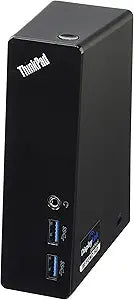
Lenovo 0A33970 ThinkPad USB 3.0 Docking Station Black
USB 3.0
Expand Your Connectivity with a Versatile Docking StationThe Lenovo ThinkPad USB 3.0 Docking Station provides a convenient way to connect your laptop to multiple devices and peripherals. With USB 3.0 ports, video outputs, and Ethernet connectivity, it's perfect for enhancing productivity and stre...
$99.89*
View on Amazon
✓ In Stock on Amazon.com
*Price sourced from Amazon.com. Last updated:Oct 25, 2026.Price and availability are subject to change — details.
Affiliate Disclosure: As an Amazon Associate, Studio Supplies earns from qualifying purchases made through links on this page, at no additional cost to you. This helps support our editorial team.
Notice a mistake? Let Us Know
Overview
Expand Your Connectivity with a Versatile Docking Station
The Lenovo ThinkPad USB 3.0 Docking Station provides a convenient way to connect your laptop to multiple devices and peripherals. With USB 3.0 ports, video outputs, and Ethernet connectivity, it's perfect for enhancing productivity and streamlining your workspace.
- USB Ports: 4 x USB 3.0, 1 x USB 3.0 always-on port
- Video Outputs: 1x DVI-D, 1 x DVI-I
- Network: 1 x Gigabit Ethernet
- Adapter: 1 x DVI-to-VGA Monitor Adapter
Key Features
4 x USB 3.0 and 1 x USB 3.0 always-on port
1x DVI D, 1 x DVI I, 1 x Gigabit Ethernet, 1 x DVI-to-VGA monitor adapter
Dock requires included AC power to operate (Does not power charge laptop)
IMPORTANT: An update of device drivers may be required for proper functionality
COMPLETE Compatibility List in DESCRIPTION
Specifications
USB Ports
4 x USB 3.0 (1x always-on)
Video Outputs
1x DVI D, 1x DVI I
Network Port
1x Gigabit Ethernet
Video Adapters
1x DVI-to-VGA monitor adapter
Power
Requires included AC power
Laptop Charging
Does not power charge laptop
Frequently Asked Questions
How many USB 3.0 ports does the Lenovo ThinkPad USB 3.0 Docking Station have?
The docking station is equipped with four USB 3.0 ports, plus one additional USB 3.0 always-on port for charging devices.
What video output options are available on this docking station?
It includes one DVI D port and one DVI I port, along with a DVI-to-VGA monitor adapter for broader compatibility.
Does the Lenovo ThinkPad USB 3.0 Docking Station charge my laptop?
No, the dock requires its included AC power to operate and does not provide power charging to the connected laptop.
Is there an Ethernet port on this docking station?
Yes, the docking station features one Gigabit Ethernet port for high-speed wired network connectivity.
Are there any specific requirements for this docking station to function properly?
An update of device drivers may be required to ensure proper functionality of the docking station with your system.
Does this docking station work with all ThinkPad models?
A complete compatibility list is provided in the product description, so it is advisable to check that list for your specific ThinkPad model.
Related Products


