



Lenovo
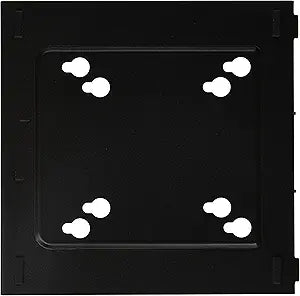
Lenovo 0B47374 Tiny VESA Mounting Bracket
★★★★★
Mount your ThinkCentre Tiny behind any VESA-compatible display and reclaim your desk without sacrificing connectivity or airflow.
$29.95*
View on Amazon
✓ In Stock on Amazon.com
*Price sourced from Amazon.com. Last updated:Jun 04, 2026.Price and availability are subject to change.
Affiliate Disclosure: Studio Supplies may earn a commission from qualifying purchases made through links on this page, at no additional cost to you. This helps support our editorial team.
Notice a mistake? Let Us Know
Overview
Key Features
Lenovo Mounting Adapter For Desktop Computer
Specifications
Accessory Type
Mounting Bracket
Compatibility
Desktop Computer
Mounting Standard
VESA
Brand
Lenovo
Pros & Cons
👍 Pros
- Eliminates desk footprint for ThinkCentre Tiny users by moving the PC to the back of any VESA-compatible monitor.
- Universal VESA standard compatibility means it works with virtually any modern flat-panel display without proprietary hardware requirements.
- Passive mechanical design has no moving parts, no power draw, and requires no drivers or firmware — nothing to fail or update.
- Keeps the Tiny PC's cable runs short and organized since the unit sits directly behind the display it connects to.
- Low-profile mounting keeps the overall monitor-plus-PC stack visually clean, suitable for professional or minimalist workspaces.
👎 Cons
- Compatibility is limited to ThinkCentre Tiny form-factor PCs — it will not fit standard desktop towers, NUCs, or other mini PC brands.
- Rear-mounted positioning can make power button and front-panel port access awkward depending on bracket orientation and desk setup.
- No built-in cable management clips or routing guides are included, so cable tidiness behind the monitor requires additional effort.
- Thermal performance of the mounted Tiny should be monitored, as restricted airflow in a tight rear-panel mounting position can raise operating temperatures under sustained load.
- Lenovo's product listing provides minimal installation documentation, which can make first-time setup slower than expected.
Frequently Asked Questions
Which ThinkCentre models is this bracket compatible with?
It is designed for ThinkCentre Tiny form-factor PCs. Verify your specific ThinkCentre Tiny model number against Lenovo's compatibility list, as bracket fitment can vary between generations of the Tiny chassis.
Does this bracket work with any VESA monitor, or only specific Lenovo displays?
VESA compatibility is a universal standard, so this bracket will mount to any display with a VESA-compliant mounting pattern — not just Lenovo monitors. Check your monitor's VESA hole pattern to confirm a fit.
Will mounting the ThinkCentre Tiny behind a monitor affect its thermal performance?
VESA-mounted Tiny PCs rely on ambient airflow rather than forced-air from the monitor itself. Ensure the bracket positions the unit so its intake and exhaust vents are not obstructed by the monitor body or cabling.
Does installation require any tools or additional hardware?
Basic installation typically requires only a screwdriver. The bracket is a passive mechanical adapter with no active components — no drivers or software are involved.
Can I access USB ports and the power button after the Tiny is mounted?
Port accessibility depends on the Tiny model's port placement and how the bracket orients the unit. Review the bracket orientation before mounting to confirm front-panel ports face a direction that allows practical daily use.
Related Products


