



Lenovo
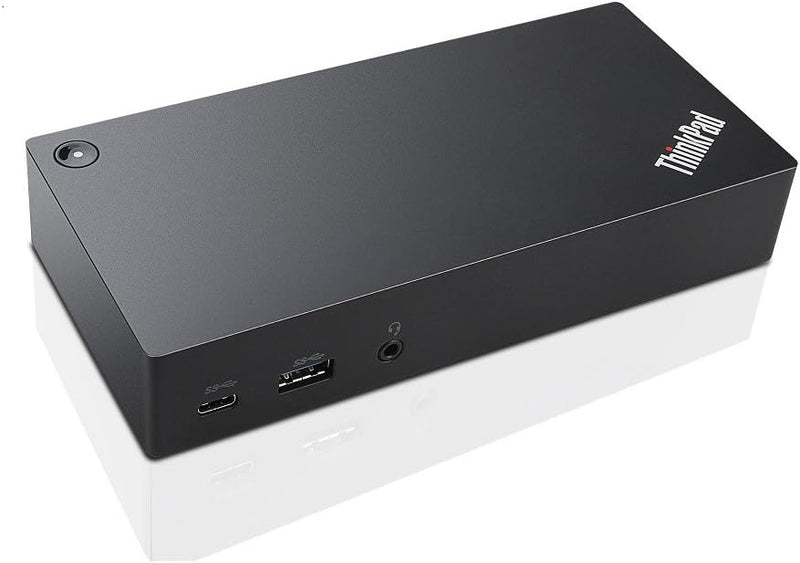
Lenovo 40A90090US ThinkPad USB-C UltraDock 90W
UHDFHD90W60WUSB-C
One USB-C cable replaces your entire peripheral chain — the ThinkPad UltraDock 90W adds dual displays, five USB ports, Ethernet, and 60W power delivery to any compatible laptop.
View price on Amazon
Affiliate Disclosure: As an Amazon Associate, Studio Supplies earns from qualifying purchases made through links on this page, at no additional cost to you. This helps support our editorial team.
Notice a mistake? Let Us Know
Overview
Key Features
3x USB 3.0 ports, 2x USB 2.0 ports.
1x USB Type-C port, 2x Display Port, 1x Ethernet RJ45 port, 3.5mm Headset jack.
Includes 90w AC power supply (Supports up to 60W Power Delivery).
Supports up to Two Displays (Single UHD display at 30Hz or dual FHD displays).
Compatible with USB-C laptops, please check your system ports and description below (some models include T470, T470s, T570, P51s, X1 Yoga 2nd Gen, Yoga 370, X1 Carbon 5th Gen, X270).
Specifications
Model
40A90090US
Host Interface
USB-C
USB-A Ports
3x USB 3.0, 2x USB 2.0
USB-C Ports
1x USB-C
Display Outputs
2x DisplayPort
Max Display Config
Single UHD @ 30Hz or Dual FHD
Network
1x Ethernet RJ45
Audio
3.5mm Headset Jack
Power Supply
90W AC
Power Delivery
Up to 60W
Total Ports
10
Dimensions
6.73" L x 1.28" W x 3.15" H
Weight
10.24 oz
Color
Black
Frequently Asked Questions
What is the maximum display configuration the 40A90090US supports?
The dock supports up to two simultaneous displays via its two DisplayPort outputs. The ceiling is either a single UHD (3840x2160) display at 30Hz, or dual FHD (1920x1080) displays. You cannot run one UHD and one FHD simultaneously at full resolution — it is one or the other configuration.
How much power does the dock deliver to the connected laptop?
The dock ships with a 90W AC power supply and delivers up to 60W via USB Power Delivery to the host laptop. This is sufficient to charge most ThinkPad ultrabooks during use, but high-TDP ThinkPad workstation models (P-series, for example) may require their own charger to maintain battery level under sustained load.
Is the 40A90090US compatible with non-Lenovo USB-C laptops?
The dock uses a standard USB-C connection and is technically compatible with any USB-C laptop that supports DisplayPort Alt Mode and USB Power Delivery. However, Lenovo explicitly validates compatibility with specific ThinkPad models including the T470, T470s, T570, P51s, X1 Yoga 2nd Gen, Yoga 370, X1 Carbon 5th Gen, and X270. Compatibility with non-Lenovo hardware is not guaranteed and may involve driver or display limitations.
How many USB ports does the dock provide, and what are their speeds?
The dock provides 5 USB-A ports total: 3x USB 3.0 (SuperSpeed, up to 5 Gbps) and 2x USB 2.0 (up to 480 Mbps), plus 1x USB-C port. For peripherals like external SSDs or high-bandwidth devices, use the USB 3.0 ports. USB 2.0 ports are suitable for keyboards, mice, and other low-bandwidth devices.
Does the dock include audio output?
Yes. The dock includes a 3.5mm headset jack that passes audio from the host laptop, allowing you to connect headphones or speakers without requiring a separate USB audio adapter.
Related Products


