

Lenovo
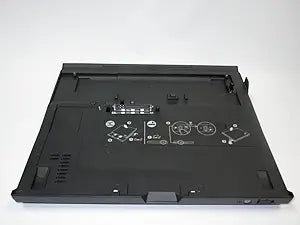
Lenovo 42W3015: ThinkPad X60/X61 UltraBase Docking Station
USB 2.0
Lenovo UltraBase docking station instantly adds ports and an optical drive bay to your ThinkPad X60 or X61.
$59.99*
View on Amazon
✓ In Stock on Amazon.com
*Price sourced from Amazon.com. Last updated:Oct 23, 2026.Price and availability are subject to change — details.
Affiliate Disclosure: As an Amazon Associate, Studio Supplies earns from qualifying purchases made through links on this page, at no additional cost to you. This helps support our editorial team.
Notice a mistake? Let Us Know
Overview
Key Features
4 x USB 2.0, 1 x VGA
1 x RJ-45 Ethernet port, 1 x RJ-11 Modem port
Integrated key lock and cable lock slot (cable lock sold separately)
Supports optional DVD or Hard drive in expansion slot
COMPATIBLE with the X60, X60s, X61, X61s
Specifications
Brand
Lenovo
Model
42W3015 (equivalent to 42W4635)
Type
Docking Station (UltraBase)
Compatibility
ThinkPad X60, X60s, X61, X61s
Frequently Asked Questions
Which ThinkPad models are compatible with this UltraBase docking station?
It is designed specifically for the Lenovo ThinkPad X60, X60s, X61, and X61s series laptops. It is not compatible with other ThinkPad lines.
How does the laptop connect to the UltraBase?
The ThinkPad snaps directly into the docking connector on the UltraBase's top surface — no cables are required. The laptop slides in and locks into place for a secure, single-motion dock connection.
Does the UltraBase include a built-in optical drive?
The UltraBase has a bay that accepts Lenovo Ultrabay Slim optical drives and other Ultrabay accessories, but the drive is typically sold separately. Check the listing details to confirm what is included.
Can I use the UltraBase to charge my ThinkPad?
Yes, when the AC adapter is connected to the UltraBase, it powers and charges the docked ThinkPad, so you only need to plug in one cable at your desk.
What is the difference between model numbers 42W3015 and 42W4635?
These are equivalent model numbers for the same UltraBase docking station. Both refer to the ThinkPad X6x series UltraBase and are functionally identical.
Related Products


