



Lenovo
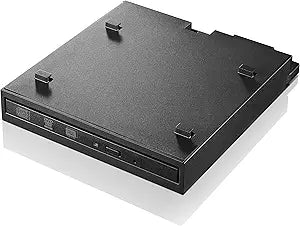
Lenovo 4XA0H03972 Tiny-in-One USB DVDRW Drive
★★★★★
USB 2.0
A purpose-built external DVD burner designed specifically for seamless integration with Lenovo Tiny-in-One desktop systems.
View price on Amazon
Affiliate Disclosure: Studio Supplies may earn a commission from qualifying purchases made through links on this page, at no additional cost to you. This helps support our editorial team.
Notice a mistake? Let Us Know
Overview
Key Features
Interface: USB 2.0
Optical storage: dvdrw (R DL) / DVD-RAM
Media load Type: tray
Specifications
Brand
Lenovo
Model
4XA0H03972
Drive Type
External DVDRW (Super-Multi Burner)
Interface
USB
Supported Formats
DVD and CD (read and write)
Compatibility
Lenovo Tiny-in-One systems
Pros & Cons
👍 Pros
- Designed for clean, seamless integration with Lenovo Tiny-in-One enclosures
- Supports both reading and writing across multiple DVD and CD formats
- Compact form factor preserves the space-saving benefit of a Tiny-in-One setup
- Easy assembly requires no special tools or technical expertise
👎 Cons
- Compatibility is limited primarily to Lenovo Tiny-in-One systems, not general-purpose USB use
- Does not support Blu-ray disc formats
- USB connection speed may result in slower burn times compared to internal SATA drives
- Optical drives are increasingly niche as software distribution moves to digital downloads
Frequently Asked Questions
Is this drive compatible with non-Lenovo computers?
It is designed specifically for Lenovo Tiny-in-One systems and may not work with standard USB ports on other computers without the Tiny-in-One enclosure.
What disc formats can this drive read and write?
It supports various DVD and CD formats for reading and writing, including standard DVD-R, DVD+R, DVD-RW, DVD+RW, CD-R, and CD-RW media.
How does this drive connect to the Lenovo Tiny-in-One system?
It integrates directly into the Tiny-in-One enclosure via USB, maintaining a clean and compact workspace without dangling cables.
Can this drive play movie DVDs?
Yes, the drive can read DVD media, but you will need compatible media player software installed on your system to play DVD video content.
Related Products


