

Lenovo
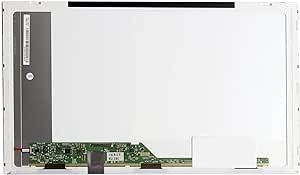
Lenovo 42T0660 15.6" WXGA HD LED Laptop Screen
A budget-friendly 15.6" WXGA HD LED replacement screen designed to restore your Lenovo laptop's display to working order.
View price on Amazon
Affiliate Disclosure: As an Amazon Associate, Studio Supplies earns from qualifying purchases made through links on this page, at no additional cost to you. This helps support our editorial team.
Notice a mistake? Let Us Know
Overview
Replace Your Damaged Screen with Ease
This compatible replacement LCD screen is designed to restore your Lenovo laptop to its original display quality. It's a cost-effective solution for repairing a cracked or damaged screen.
Specifications:
- Screen Size: 15.6 inches
- Resolution: WXGA HD
- Backlight: LED
- Type: Compatible Replacement
Frequently Asked Questions
What Lenovo laptop models is this screen compatible with?
This screen is a compatible replacement for Lenovo laptops that use the 42T0660 part number with a 15.6" WXGA HD LED panel. Check your laptop's existing screen part number to confirm compatibility before purchasing.
What is the resolution of this replacement screen?
The screen features WXGA HD resolution (1366 x 768 pixels) with LED backlighting, matching the original factory display specification.
Does this screen come with installation tools or instructions?
This is the LCD panel only. You will need basic tools such as a small Phillips screwdriver and a plastic pry tool to remove the bezel and swap the panel. Installation typically involves removing the bezel, unscrewing the old panel, disconnecting the video cable, and reversing the process with the new screen.
Is this an original Lenovo OEM screen or a third-party compatible panel?
This is a compatible replacement screen, not an original Lenovo OEM part. It is manufactured to match the same specifications and connector type as the original.
Related Products

