



Lenovo
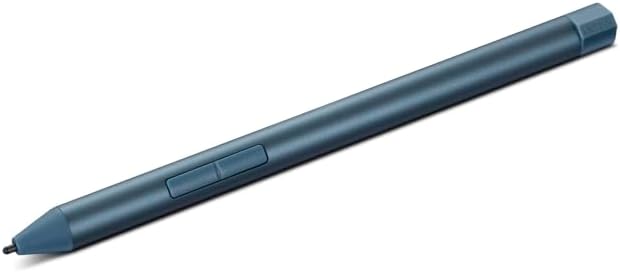
Lenovo Digital Pen 3 Tidal Teal Digital Pen
★★★★★
Versatile digital pen with 4,096 pressure levels and six-protocol compatibility for natural sketching and writing on Lenovo devices.
View price on Amazon
Affiliate Disclosure: Studio Supplies may earn a commission from qualifying purchases made through links on this page, at no additional cost to you. This helps support our editorial team.
Notice a mistake? Let Us Know
Overview
Key Features
Smooth Experience: Extend the boundaries of what you can create with the Lenovo Digital Pen 3’s advanced tilt recognition. Thanks to this intuitive feature, you can perfect your sketches and drawings with the natural feeling of pen on paper. For Use with Lenovo Laptops Only (Does not work with Lenovo Tablets)
For the Artists: The Digital Pen 3 redefines the standards of versatility, supporting an extensive range of protocols—WGP, MPP2.0, AIT, USI1.0, AES2.0, and AES1.0. Its wide-reaching compatibility ensures it works harmoniously across many devices, elevating your digital interaction
High Sensitivity: Crafted for the artist in you, the Lenovo Digital Pen 3 mimics the authentic sensation of writing with 4,096 levels of pressure sensitivity. Its unparalleled accuracy and linearity bring out the finest details in every stroke, offering the truest digital writing experience
Supported Protocols: WGP / MPP2.0 / AIT / USI1.0 / AES2.0 / AES1.0, 4,096 levels of pressure, 2 side buttons, Elastomer tip, Pen cap: bump design, Tilt detection
Compatible with: Yoga Book 9 13IMU9(#83FF), Yoga Book9 13IRU8(#82YQ), Yoga Book9 13IRU8(#82YQ), IdeaPad 5 2-in-1 14Q8X9(#83GH), IdeaPad Duet 3 11IAN8(#82XK), IdeaPad Flex 5 14ABR8(#82XX), IdeaPad Flex 5 16ABR8(#82XY), ThinkPad X12 Detachable Gen 2(#21LK), ThinkPad X12 Detachable Gen 2(#21LL), P16 Gen 2(#21FA), P16 Gen 2(#21FB), P16(#21D6), P16(#21D7), ThinkBook Plus Gen 4 IRU(#21JJ), ThinkBook Plus Gen 5 Hybrid Station(#21N9)
Specifications
Supported Protocols
WGP, MPP 2.0, AIT, USI 1.0, AES 2.0, AES 1.0
Pressure Sensitivity
4,096 levels
Buttons
2 side buttons
Tip Material
Elastomer
Tilt Detection
Yes
Pen Cap
Bump design
Body Material
Metal
Color
Tidal Teal
Battery
1 AAAA (included)
Brand
Lenovo
Model
Digital Pen 3
Pros & Cons
👍 Pros
- Six-protocol support provides exceptionally broad compatibility across many Lenovo device generations.
- 4,096 levels of pressure sensitivity deliver fine control for detailed artwork and natural handwriting.
- Tilt detection adds realistic shading and stroke variation for drawing and sketching.
- Elastomer tip provides a comfortable, paper-like writing feel with minimal screen noise.
- Metal construction gives the pen a solid, premium feel in hand.
👎 Cons
- Compatible only with specific Lenovo devices, limiting its usefulness if you switch to a non-Lenovo tablet or laptop.
- Requires a AAAA battery, which is less common than AAA or rechargeable pen alternatives.
- Does not include Bluetooth connectivity, so features like remote presentation control are not available.
- No on-pen eraser tip on the opposite end, requiring button-based eraser activation instead.
Frequently Asked Questions
Which pen protocols does the Lenovo Digital Pen 3 support?
It supports six protocols: WGP, MPP 2.0, AIT, USI 1.0, AES 2.0, and AES 1.0, making it compatible with a wide range of Lenovo laptops and 2-in-1 devices that use any of these standards.
What type of battery does the pen use and is one included?
The pen uses a single AAAA battery, and one is included in the box so you can start using it right away.
Does the pen support tilt detection for shading?
Yes, the Digital Pen 3 features tilt recognition, allowing you to angle the pen to vary stroke width and shading naturally, similar to how a traditional pencil behaves on paper.
What are the two side buttons used for?
The two side buttons can be configured through your device's pen settings to perform functions like right-click, erase, or launch specific applications, depending on your operating system and device support.
Can this pen be used with non-Lenovo devices?
The pen is designed and tested for specific Lenovo devices. While it uses common protocols like USI 1.0 and MPP 2.0 that other manufacturers also support, Lenovo only guarantees compatibility with the listed Lenovo models.
Related Products


