



Logitech
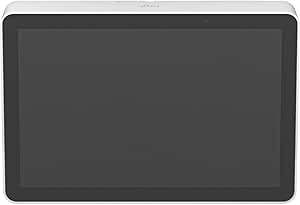
Logitech 952-000088 Tap IP Conference Room Touch Controller
Simplify conference room meetings with the Logitech Tap IP's one-touch join, 10.1" display, and clean single-cable PoE installation.
$795.95*$828.30Save 3%
View on Amazon
✓ In Stock on Amazon.com
*Price sourced from Amazon.com. Last updated:Oct 25, 2026.Price and availability are subject to change — details.
Affiliate Disclosure: As an Amazon Associate, Studio Supplies earns from qualifying purchases made through links on this page, at no additional cost to you. This helps support our editorial team.
Notice a mistake? Let Us Know
Overview
Key Features
With unmatched performance and clarity, this video conference equipment lets you conduct better video conference meetings
Fast Ethernet port is the ideal solution for enhanced conference calling
With the 10/100Base-TX technology, get up to 100Mbps data transfer rate over the twisted pair cable
Specifications
Brand
Logitech
Model
952-000088
Product Name
Tap IP
Display
10.1" Touch Screen
Ethernet
Fast Ethernet 10/100Base-TX
Max Data Transfer Rate
100 Mbps
Power
Power over Ethernet (PoE)
Mounting Options
Table, Riser, Wall Mount
Motion Sensor
Built-in
Viewing Angle
14° ergonomic tilt
Frequently Asked Questions
How is the Logitech Tap IP powered and connected?
The Tap IP runs on a single Power over Ethernet (PoE) cable that supplies both power and network data, eliminating the need for a separate power adapter or long cable runs to the room system.
Does the Tap IP require a connected PC or room system to operate?
The Tap IP connects via the network rather than a direct USB link to a room system, giving it flexible, untethered placement anywhere in the conference room.
What mounting options are available for the Tap IP?
Logitech offers table, riser, and wall mount options so the controller can be securely placed wherever it is most convenient for meeting participants.
Does the Tap IP screen stay on all the time?
The built-in motion sensor detects when someone approaches and wakes the display automatically, then saves power by dimming when the room is idle.
What is the maximum network speed supported by the Tap IP?
The Tap IP includes a Fast Ethernet port supporting 10/100Base-TX, providing up to 100 Mbps data transfer over the PoE connection.
Related Products


