

Logitech
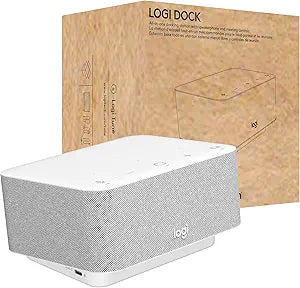
Logitech 986-000031 Logi Dock USB-C Docking Station
100W85WUSB-CUSB C
Streamline Your Workspace with Seamless Connectivity and CollaborationIntroducing the Logitech Logi Dock. An all-in-one USB-C docking station designed to simplify your home office setup, enhance meeting experiences, and improve overall productivity. All-in-One USB C Laptop Docking Station Speaker...
$299.90*
View on Amazon
✓ In Stock on Amazon.com
*Price sourced from Amazon.com. Last updated:Oct 23, 2026.Price and availability are subject to change — details.
Affiliate Disclosure: As an Amazon Associate, Studio Supplies earns from qualifying purchases made through links on this page, at no additional cost to you. This helps support our editorial team.
Notice a mistake? Let Us Know
Overview
Streamline Your Workspace with Seamless Connectivity and Collaboration
Introducing the Logitech Logi Dock. An all-in-one USB-C docking station designed to simplify your home office setup, enhance meeting experiences, and improve overall productivity.
- All-in-One USB C Laptop Docking Station
- Speakerphone
- Noise Canceling Mics
- Bluetooth
- HDMI
- Certified for Zoom, Google Meet, Google Voice
Key Features
More Productivity: Logi Dock connects and charges up to five USB peripherals and two monitors, eliminates desktop clutter and streamlines your home office to optimize productivity
Sync Calendar: By syncing your calendar with Logi Dock via Logi Tune, you can get informed of upcoming appointments and join your meetings by simply pressing a button
Noise Canceling Microphones: The built-in speakerphone includes six beamforming mics that capture your voice clearly while advanced algorithms reduce unwanted background noise
Features: Small but mighty speakers deliver immersive audio, a powerful bass line and volume you can crank way up; easily stream audio from your mobile devices to Logi Dock via Bluetooth
Virtual Meetings: Logi Dock is certified for Google Meet, Google Voice, Zoom and Tencent Meeting, while also compatible with common calling applications across most platforms and operating systems
Power Your Laptop: Charge your PC or Mac through Logi Dock’s USB C upstream port, which delivers up to 100W of power while safely charging laptops requiring 85W or less
Private Conversations: Switch the audio from Logi Dock’s speakerphone to your personal audio by turning on your Zone Wireless Headset
Create a Wireless Workspace: Pair Logi Dock with Zone wireless products, and connect any Logi Bolt–enabled keyboard and mouse with a Logi Bolt receiver
Specifications
USB Peripheral Connectivity
Up to five USB peripherals
Monitor Connectivity
Up to two monitors
Speakerphone
Built-in with six beamforming mics
Audio Output
Speakers with powerful bass
Calendar Sync
Via Logi Tune
Virtual Meeting Certifications
Google Meet, Google Voice, Zoom, Tencent Meeting
Laptop Charging Power
Up to 100W via USB-C upstream
Wireless Connectivity
Bluetooth, Logi Bolt (for compatible devices)
Frequently Asked Questions
How many devices can the Logi Dock connect and charge simultaneously?
The Logi Dock can connect and charge up to five USB peripherals and two monitors, helping to reduce desktop clutter.
Can this docking station help with joining virtual meetings?
Yes, by syncing your calendar with Logi Dock via Logi Tune, you can receive notifications for upcoming appointments and join meetings with a single button press.
Does the Logi Dock have an integrated speakerphone for calls?
Yes, it features a built-in speakerphone equipped with six beamforming microphones that capture your voice clearly while utilizing advanced algorithms to reduce background noise.
Is the Logi Dock compatible with popular video conferencing platforms?
The Logi Dock is certified for Google Meet, Google Voice, Zoom, and Tencent Meeting, and is also compatible with common calling applications across most platforms and operating systems.
Can the Logi Dock charge my laptop?
Yes, you can charge your PC or Mac through Logi Dock’s USB-C upstream port, which delivers up to 100W of power, suitable for laptops requiring 85W or less.
How does the Logi Dock handle private conversations?
You can easily switch the audio from Logi Dock’s speakerphone to your personal audio by activating your Zone Wireless Headset for private conversations.
Can I stream music from my phone to the Logi Dock?
Yes, you can easily stream audio from your mobile devices to the Logi Dock via Bluetooth.
Related Products


