Logitech

Logitech 991-000397 Roommate Tap IP Video Conferencing Kit

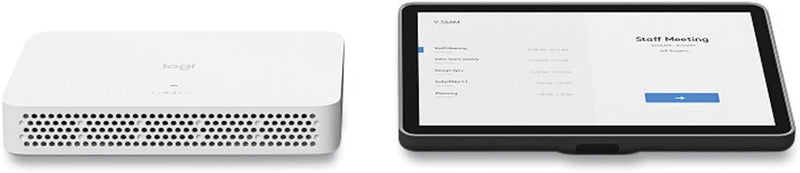
The Logitech RoomMate + Tap IP bundle converts any camera-equipped meeting room into a fully appliance-based video conferencing space with one-touch join — no PC required.

$1,869.63*
In Stock on Amazon.com
View on Amazon

*Price sourced from Amazon.com. Last updated:Jul 14, 2026.Price and availability are subject to change.

Affiliate Disclosure: Studio Supplies may earn a commission from qualifying purchases made through links on this page, at no additional cost to you. This helps support our editorial team.

Notice a mistake? Let Us Know

Overview

The Logitech 991-000397 bundle pairs the RoomMate compute appliance with the Tap IP touch controller to deliver a purpose-built video conferencing infrastructure for meeting rooms. RoomMate is a dedicated Android-based compute unit that runs Microsoft Teams Rooms or Zoom Rooms natively — it is not a general-purpose computer, and that constraint is a deliberate engineering decision. By locking the hardware to a certified software configuration, Logitech eliminates the update conflicts, session state issues, and peripheral driver problems that plague PC-based room systems. The Tap IP controller connects via PoE Ethernet, which means a single structured cabling run handles both power and communication — a meaningful simplification for commercial AV installations where clean cable management affects both aesthetics and serviceability.

This bundle targets IT and AV professionals building out or standardizing meeting rooms in organizations already committed to Microsoft Teams or Zoom. The "no AV" designation is deliberate — the bundle provides the compute and control layer, with the expectation that the camera (Rally Bar, MeetUp, etc.) is selected based on room size and layout. A small huddle room might pair this with a MeetUp; a larger boardroom with a Rally Bar. The compute mount enables discreet hardware placement behind displays, keeping the room's visible technology footprint to the Tap IP on the table. For organizations deploying at scale, the RoomMate's compatibility with Logitech Sync centralized management transforms room monitoring and updates from a manual site-visit process into a remote administration task.

Key Features

Appliance Bundle (no AV) for Video Rooms

Video conferencing kit (Logitech Tap IP)

Specifications

Product Type
Video conferencing kit
Model Name
Roommate Tap IP
Kit Type
Appliance Bundle (no AV)

Pros & Cons

👍 Pros

  • Appliance architecture eliminates the general-purpose PC from the room, reducing IT management overhead and improving boot reliability for back-to-back meetings.
  • Tap IP's PoE connectivity simplifies cable routing — a single Ethernet run powers and connects the touch controller with no separate power adapter required.
  • One-touch join via the Tap IP interface reduces meeting start friction, which translates directly to fewer wasted minutes at the beginning of scheduled calls.
  • Compact RoomMate form factor enables discreet installation behind displays or in AV racks, keeping the meeting room aesthetically clean.
  • Ambidextrous Tap IP design supports flexible table placement without orientation constraints.

👎 Cons

  • No camera or audio peripherals are included — a compatible Logitech conference camera must be sourced separately, which significantly increases the total room deployment cost.
  • Platform support is limited to certified UC platforms (Teams Rooms, Zoom Rooms); organizations on other video systems cannot use the RoomMate as a native appliance.
  • As a closed appliance, the RoomMate does not support arbitrary app installation or custom software — IT cannot run non-certified conferencing clients on the hardware.
  • Firmware updates are managed through Logitech's Sync management platform; rooms without Sync enrollment require manual update procedures.
  • The bundle provides no display — monitor or TV must be sourced and mounted independently.

Frequently Asked Questions

Appliance-based means the RoomMate compute unit runs the video conferencing software natively — there is no host laptop or PC required in the room. For IT, this simplifies deployment significantly: no workstation to manage, patch, or replace, and the device boots into a known, managed state. It reduces the attack surface and eliminates the variability of a general-purpose Windows or Mac host.
RoomMate is certified for Microsoft Teams Rooms and Zoom Rooms as a native appliance. Platform compatibility is determined by Logitech's software support — verify current platform certifications against your organization's UC deployment before purchasing.
No. The 991-000397 bundle contains the Tap IP touch controller, the RoomMate compute unit, and a compute mount. A compatible Logitech conference camera (such as the Rally, Rally Bar, or MeetUp) must be connected separately. The bundle is explicitly designated as "no AV."
The Tap IP connects via Power over Ethernet (PoE), which means a single Ethernet cable carries both data and power to the touch controller. This simplifies cable management at the conference table and eliminates the need for a separate power adapter at the Tap IP location.
The compute mount is designed for discreet installation of the RoomMate unit — typically behind a display or on a wall near the room's AV equipment. It positions the compute unit out of sight while maintaining access to ports and ventilation.