



Logitech
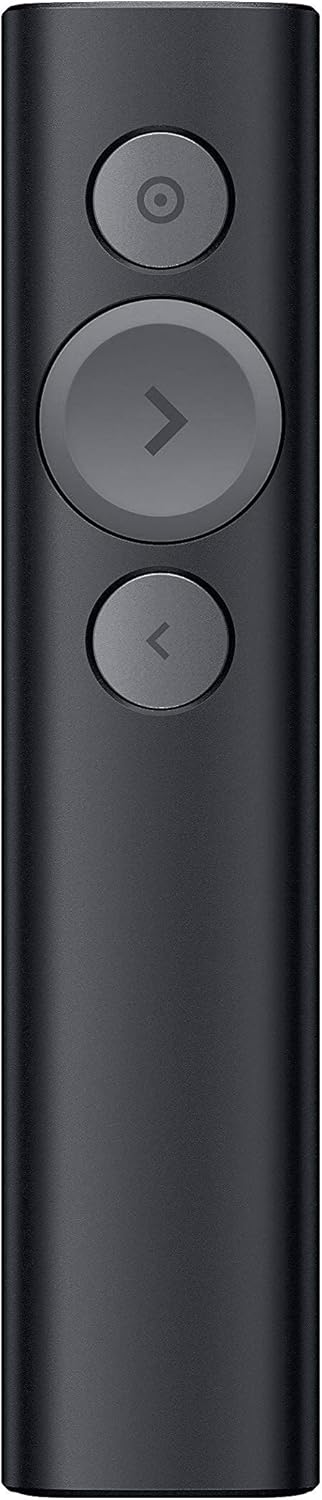
Logitech Spotlight Presentation Remote with Bluetooth Renewed
Elevate Your Presentations with the Logitech Spotlight Presentation Remote The Logitech Spotlight Presentation Remote offers advanced digital highlighting and precise on-screen control. Seamlessly highlight areas of focus, manage your time effectively with smart vibration alerts, and navigate con...
$74.95*$119.99Save 37%
View on Amazon
✓ In Stock on Amazon.com
*Price sourced from Amazon.com. Last updated:Oct 22, 2026.Price and availability are subject to change — details.
Affiliate Disclosure: As an Amazon Associate, Studio Supplies earns from qualifying purchases made through links on this page, at no additional cost to you. This helps support our editorial team.
Notice a mistake? Let Us Know
Overview
Elevate Your Presentations with the Logitech Spotlight Presentation Remote
The Logitech Spotlight Presentation Remote offers advanced digital highlighting and precise on-screen control. Seamlessly highlight areas of focus, manage your time effectively with smart vibration alerts, and navigate content like a mouse. Connect effortlessly via USB or Bluetooth, and present with confidence using universal compatibility.
Specifications:
- Pointing Technology: Advanced Digital Highlighting
- Connectivity: Bluetooth, USB Receiver
- Wireless Range: 30M
- Compatibility: Windows, Mac OS, PowerPoint, Keynote, PDF, Google Slides, Prezi
- Charging: Quick Charging
- Special Features: Mouse-Like Cursor Control, Smart Time Management
- Color: Black
- Product Dimensions: 0.48 x 1.11 x 5.17 inches
- Item Weight: 6.4 ounces
Key Features
Highlight and magnify on screen - go beyond traditional laser pointing. Use the advanced pointer system to precisely highlight or magnify areas of focus in pixel-perfect detail. Visible to audience in-person and via video conference. Set your pointer mode with the Logitech presentation app. Enabled via Logitech presentation app.
Mouse-like cursor control - Use the on-screen cursor to play and pause videos, open links, and enjoy a range of rich content interaction.
Smart time management- Spotlight reminds you when it's time to wrap up. The presentation remote vibrates five minutes before the end of your presentation and again when your time is fully up. Track presenting time and customize vibration alerts in the Logitech presentation app. Enabled via Logitech presentation app.
Dual connectivity - connect to your computer via USB receiver or low energy Bluetooth smart. And switch seamlessly between the 2 by plugging or unplugging the receiver. A convenient, built-in dock stores The USB Receiver when not in use.
Universal compatibility - Spotlight is optimized to work with Windows, Mac OS and all leading presentation software including PowerPoint, Keynote, PDF, Google Slides, and Prezi.
Specifications
Brand
Logitech
Model
Spotlight Presentation Remote
Pointer Features
Highlight, Magnify
Connectivity
USB receiver, Bluetooth smart
Compatibility
Windows, Mac OS, PowerPoint, Keynote, PDF, Google Slides, Prezi
Feature Customization
Logitech presentation app
Frequently Asked Questions
How does the advanced pointer system work?
The advanced pointer system allows you to precisely highlight or magnify specific areas on your screen, making it visible to both in-person and video conference audiences, configurable via the Logitech presentation app.
Can I interact with on-screen content using this remote?
Yes, the remote provides mouse-like cursor control, enabling you to play and pause videos, open links, and engage with other rich content during your presentation.
Does this presentation remote help with time management?
Absolutely, the Spotlight remote includes smart time management, reminding you when to wrap up with vibrations five minutes before the end and when your time is fully elapsed, customizable through the Logitech presentation app.
What are the connectivity options for the Logitech Spotlight remote?
You can connect to your computer using either the included USB receiver or through low energy Bluetooth smart, with seamless switching between the two methods.
Is this remote compatible with different operating systems and presentation software?
Yes, the Spotlight is universally compatible and optimized for Windows, Mac OS, and popular presentation software such as PowerPoint, Keynote, PDF, Google Slides, and Prezi.
Related Products


